Live in your Reclearly workspace

All of your accounts,
finally kept up.
Without hiring anyone.

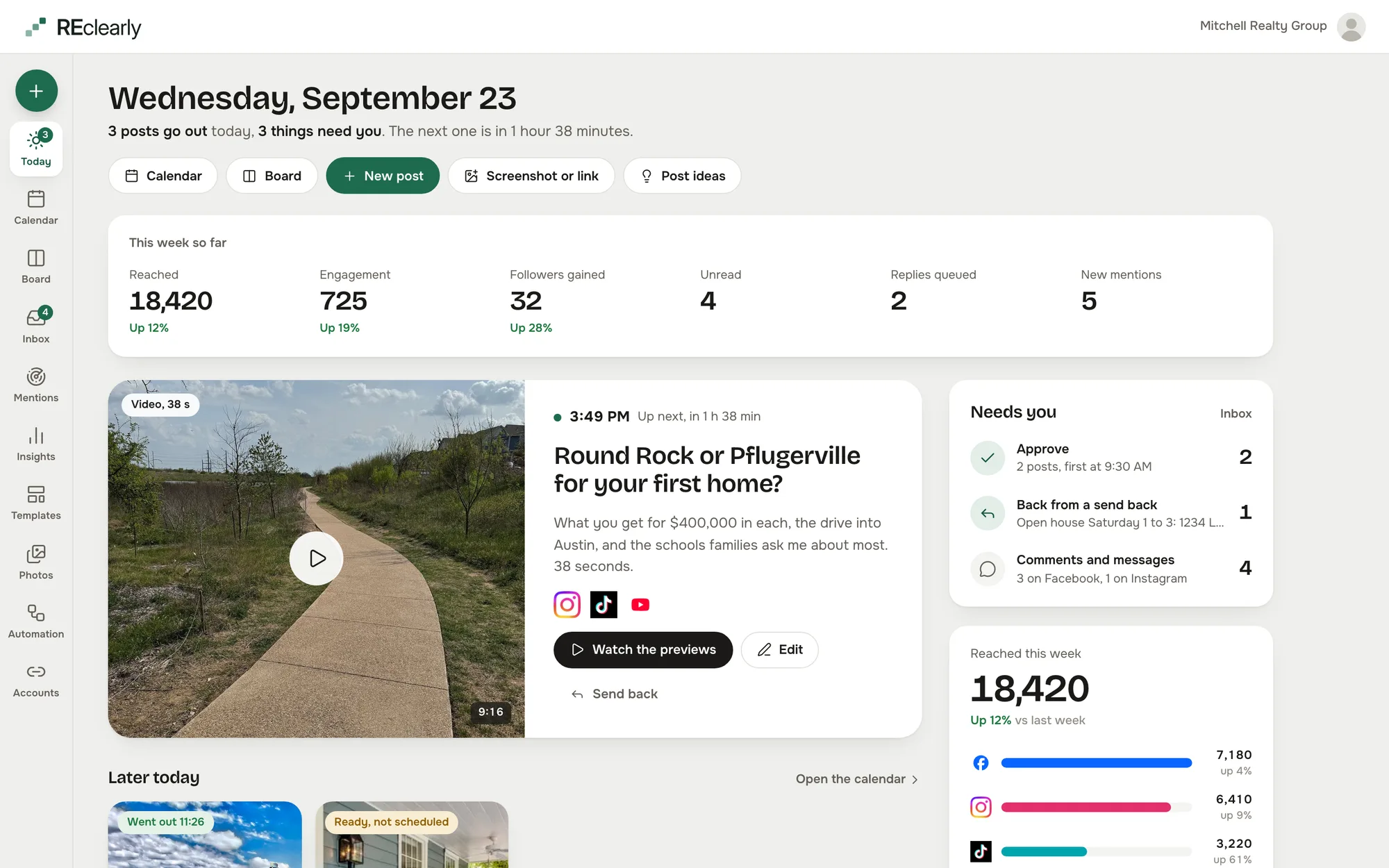
Post, schedule, answer the comments and messages, and see what worked, on twelve networks from one studio inside Reclearly. It drafts your week in your own voice, makes the graphics from your own listings, and waits for your yes.

Captured from the live studio on a demo account, Mitchell Realty Group, an invented Austin, Texas team. Every agent, listing, number and message in it is invented.

Supported platforms

Connect once and reach twelve networks with it

Post, schedule, answer the comments and messages, and read the numbers. Twelve networks, one studio. Pick one to see what the studio does there.

The problem

Social media is the job that never gets its own hour.

Every agent knows they should post. The studio does the drafting, the shaping and the answering, and leaves you the part that needs you: the yes.

Posting

“I will post this weekend.” Then it is Thursday.

Posting slips because it is the job with no deadline. Ask the studio for a week and the planner drafts it from your own sources, the writer writes it in your voice, and the reviewer checks it. You open the board and say yes.

The weekly planner
Networks

A post that fits Instagram is wrong on Google Business.

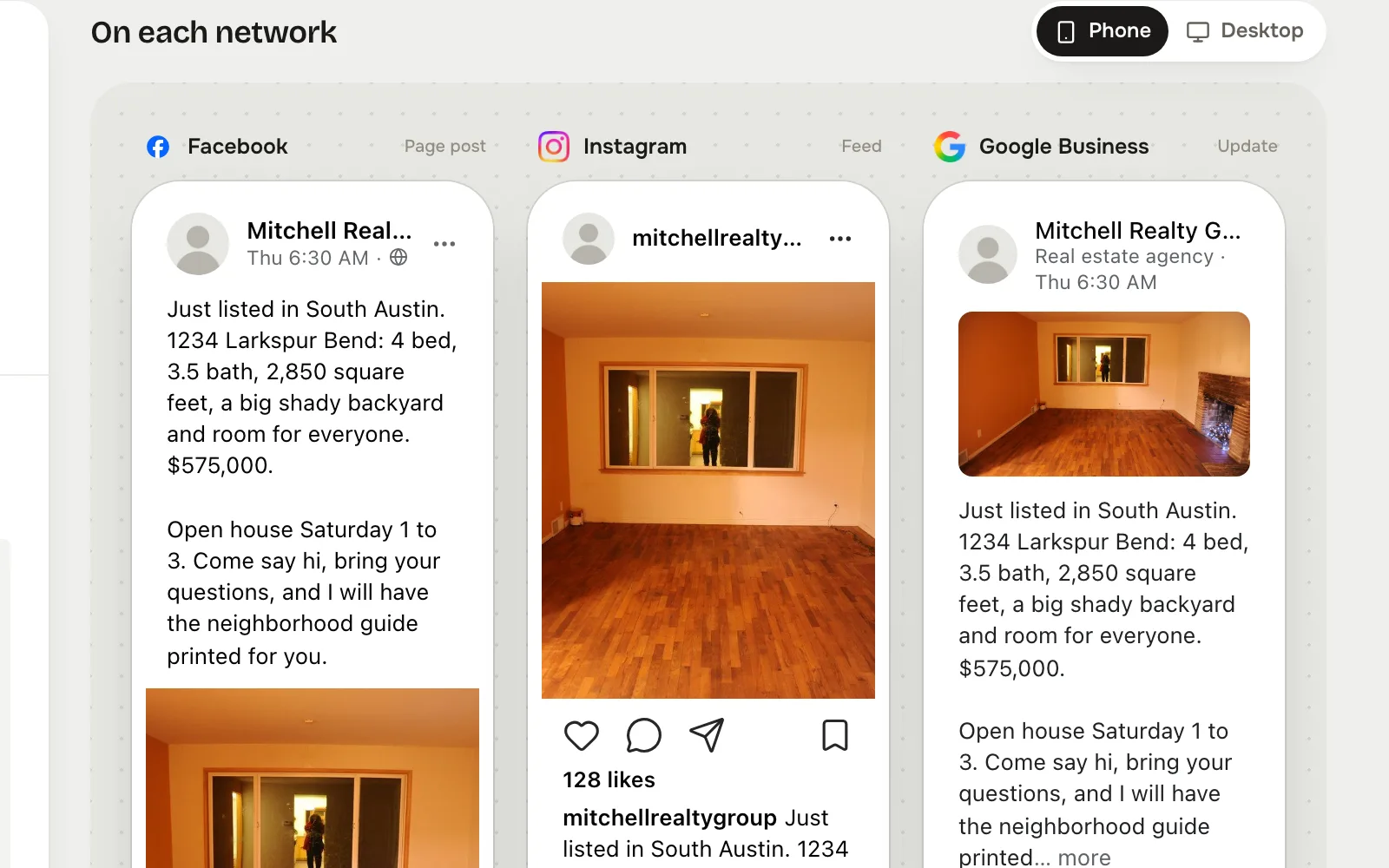
Each network wants a different length, a different shape and a different link. Write it once and the studio previews it per network, side by side, so you fix the one that needs it and leave the rest alone.

Write once
Replies

Comments in one app, messages in another, a lead in neither.

Every comment and message lands in one inbox with Reply, Lead, Later and Done. Keyword rules answer the questions you get every week, and only once you turn them on.

One inbox
Voice

Every AI caption sounds like the same stranger.

You set your voice once, in plain words: how you sound, what you say, what you never say. The studio reads that card before it writes a line, and the reviewer sends back anything that does not sound like you.

In your voice
Write once

One post. The right shape on every network.

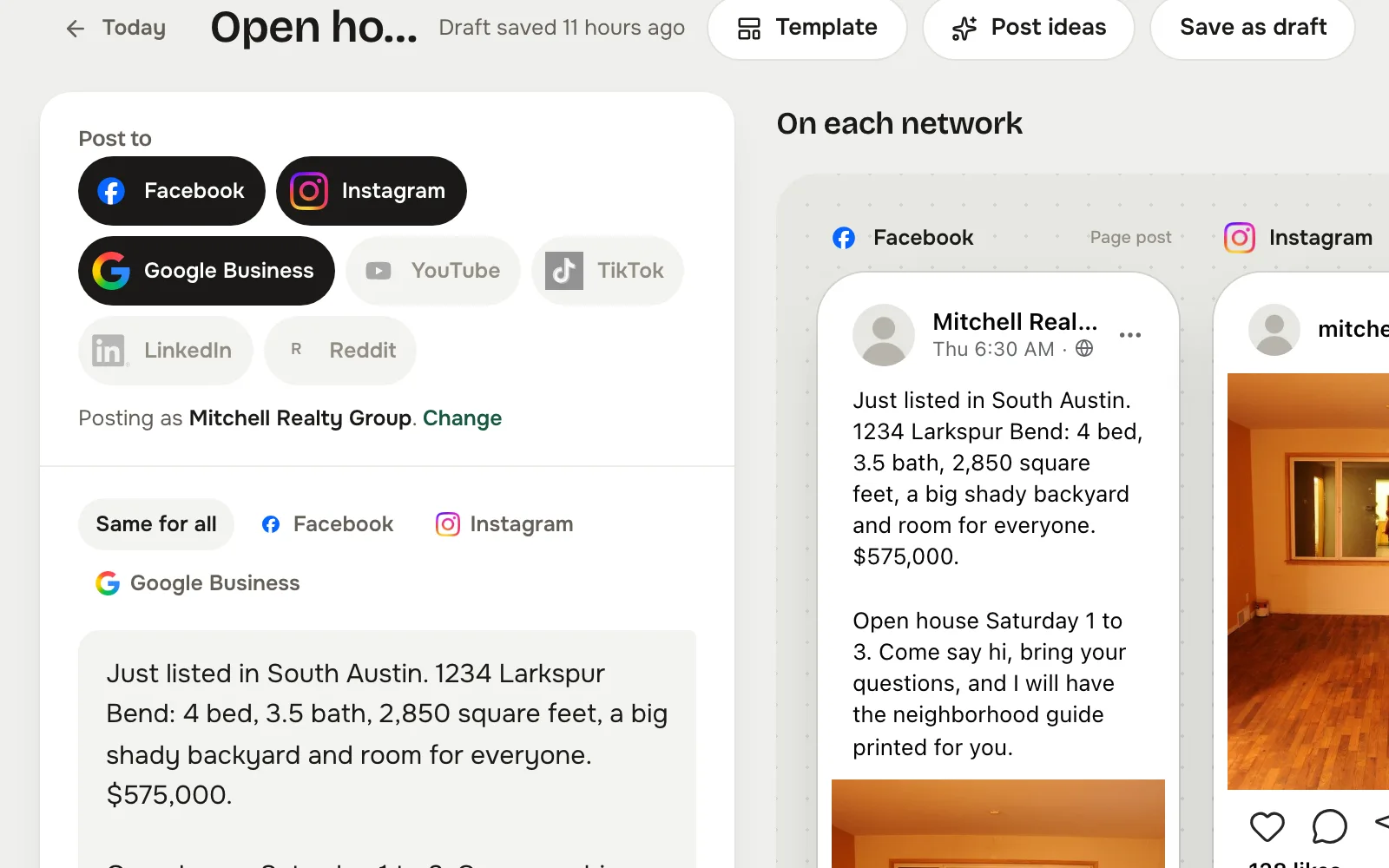
Pick the networks, write it once, and check each preview before it goes anywhere. A Google Business post is not a Facebook post with the hashtags stripped.

  1. 01

    Pick where it goes

    Facebook, Instagram, Google Business, YouTube, TikTok and LinkedIn. Tap the networks this post belongs on. Post as the shared page or as yourself.

  2. 02

    Write it once

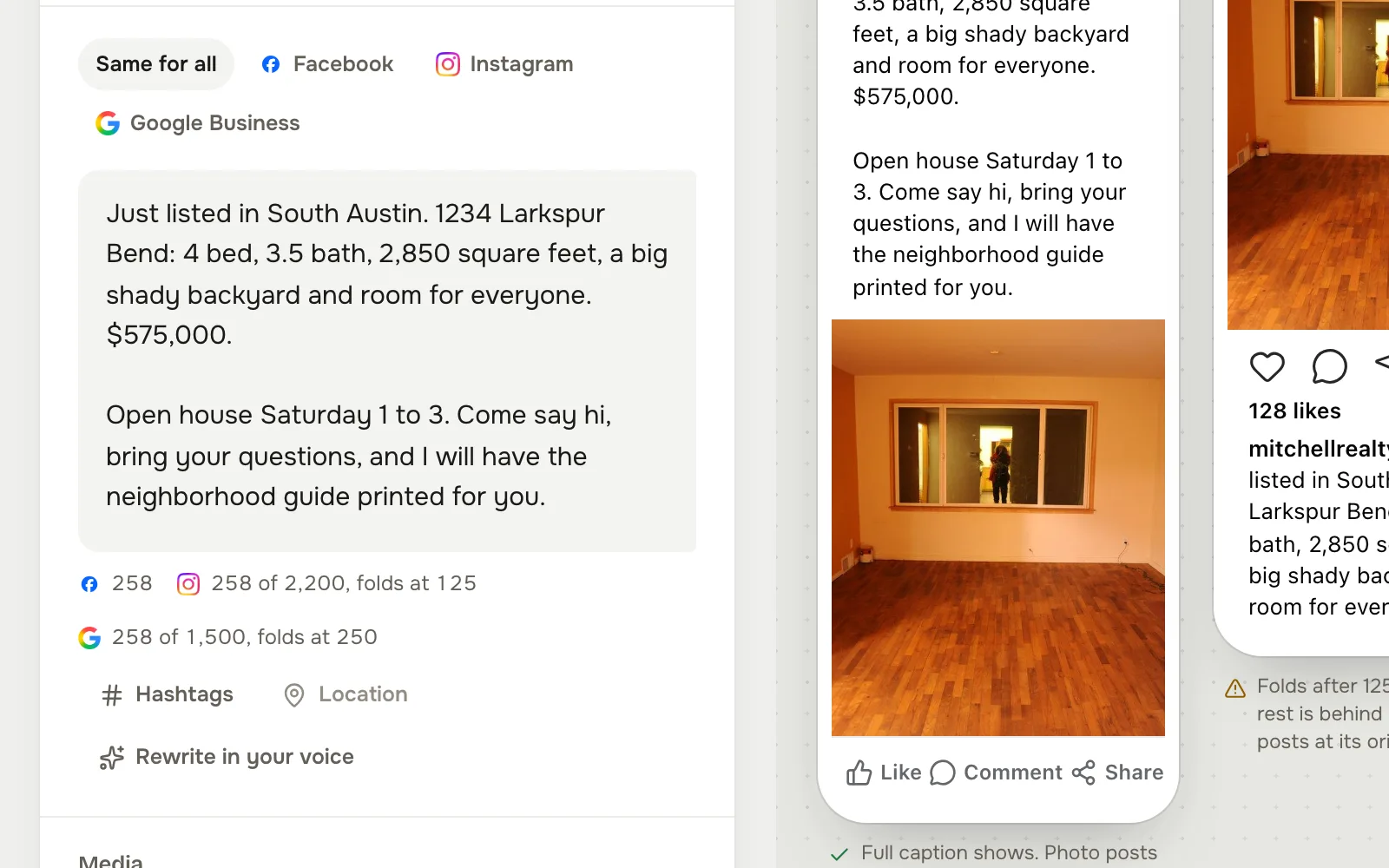
    One caption for all of them, or a version for the network that needs its own. Hashtags, a location, a character count per network, and a rewrite in your own voice are one tap away.

  3. 03

    See each network before it goes

    Previews sit side by side, phone or desktop, each in its own network's shape. The studio tells you where a caption folds behind “more” and when a network will not take a post without a picture.

  4. 04

    It lands on your calendar

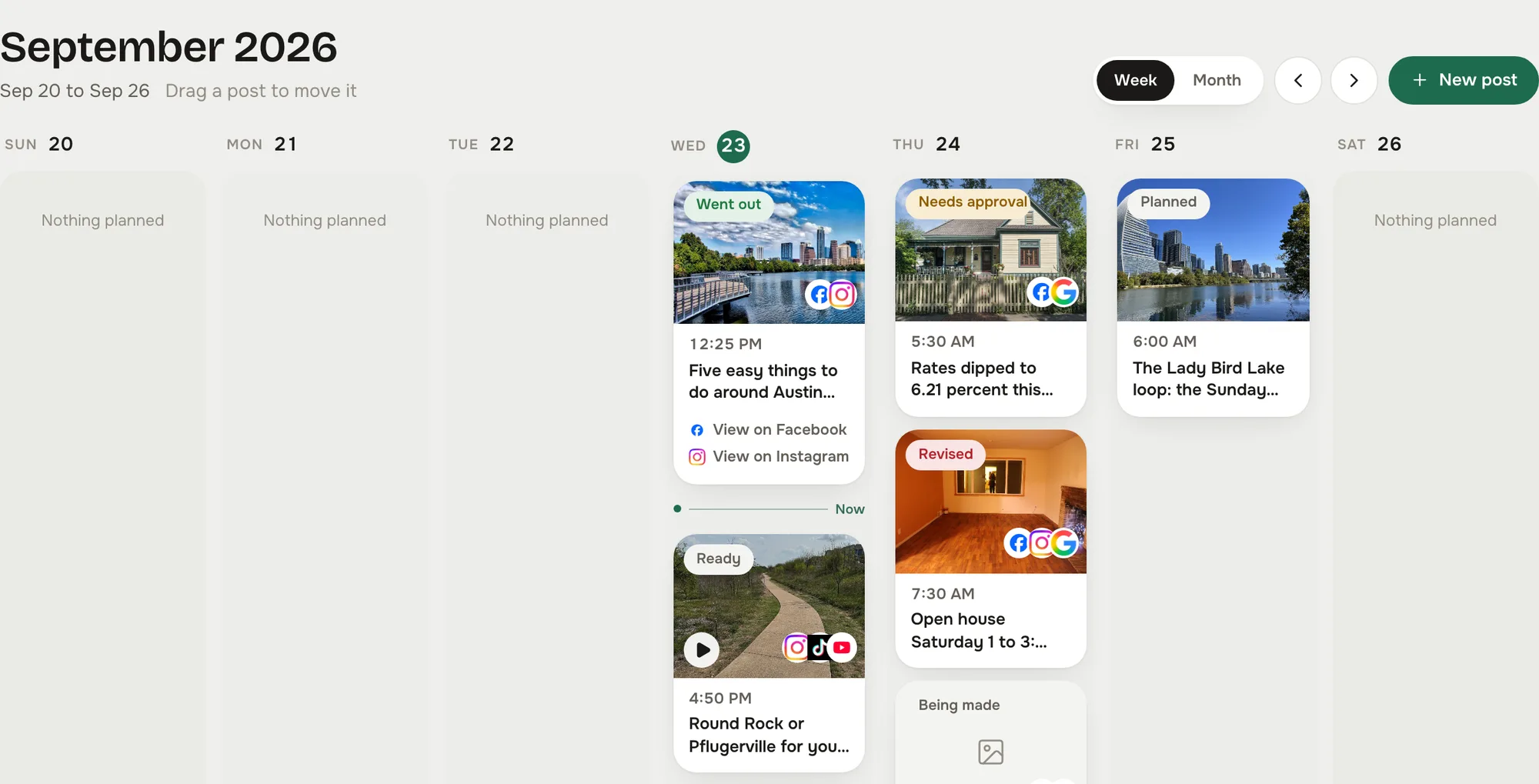
    Pick the slot and the post goes to the board as Ready, then out on time through the studio's own clock. Week or month view, drag a post to move it.


Pick where it goes
Write it once
See each network before it goes
It lands on your calendar
Branded graphics

Listing graphics from your own photos, in your own colors.

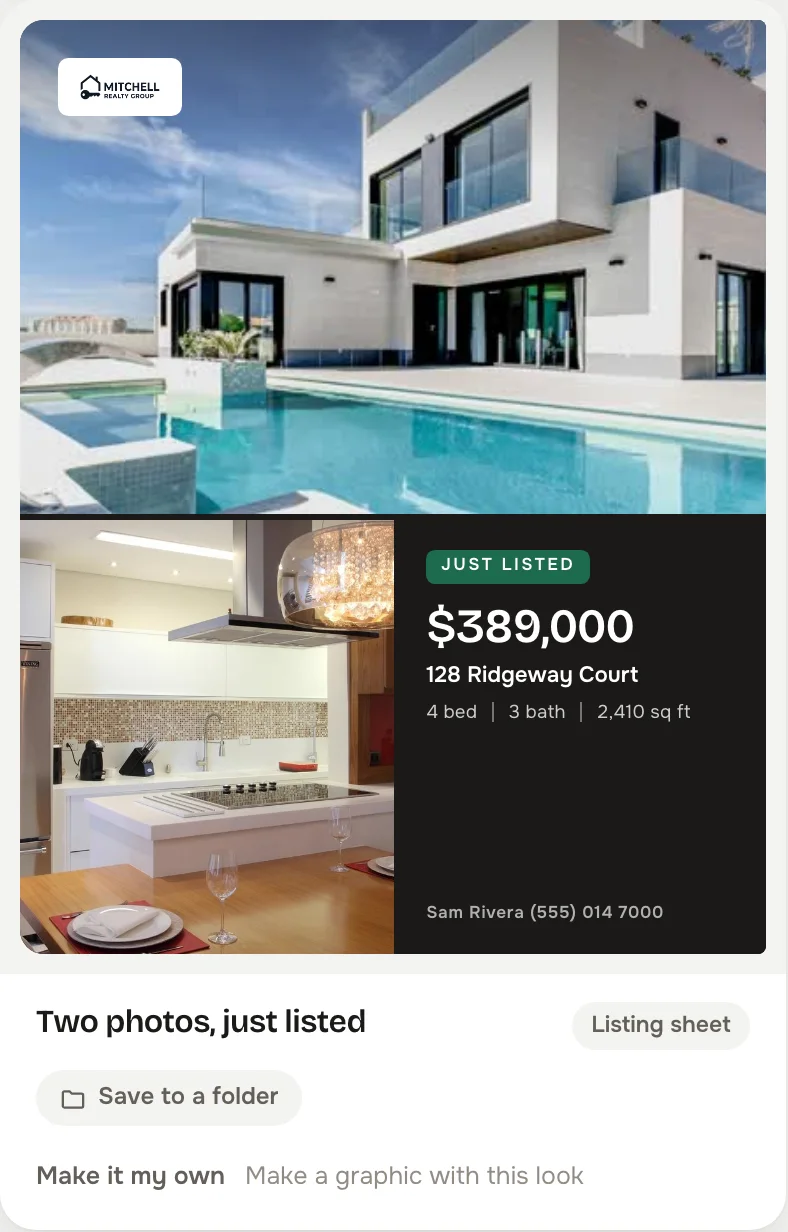
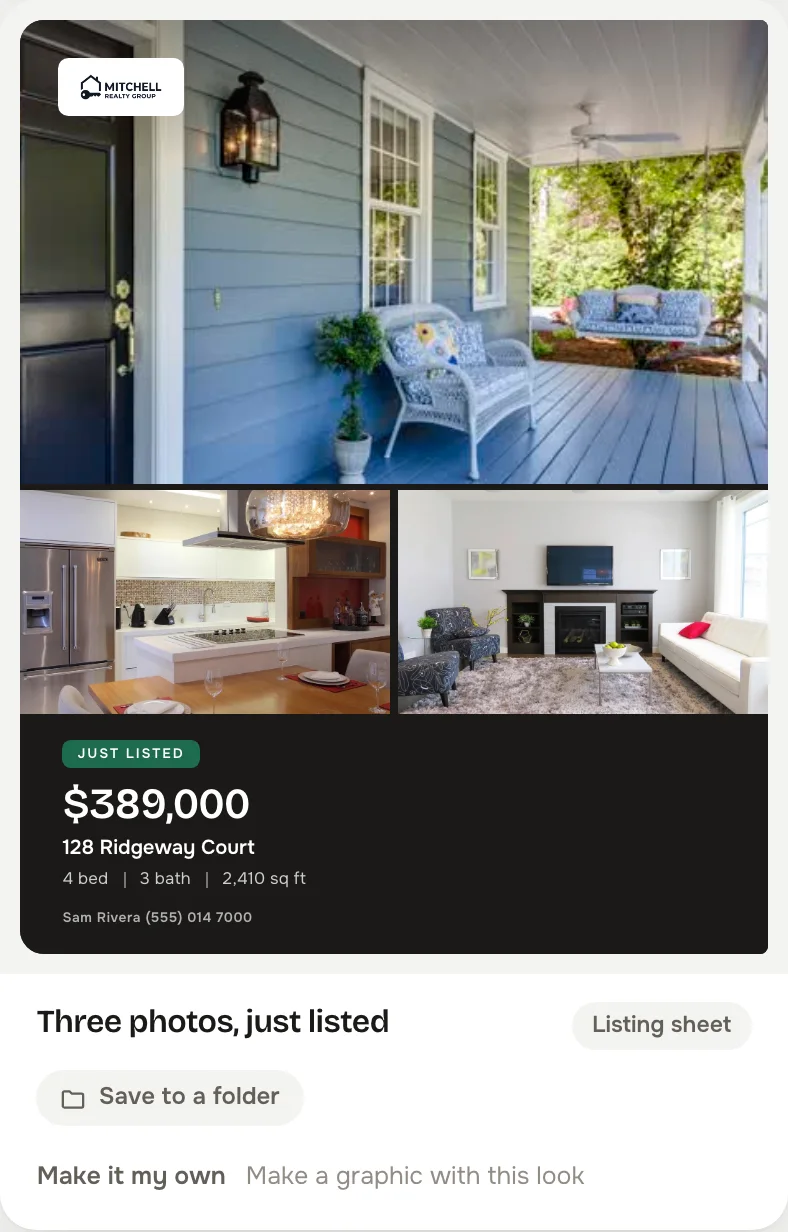
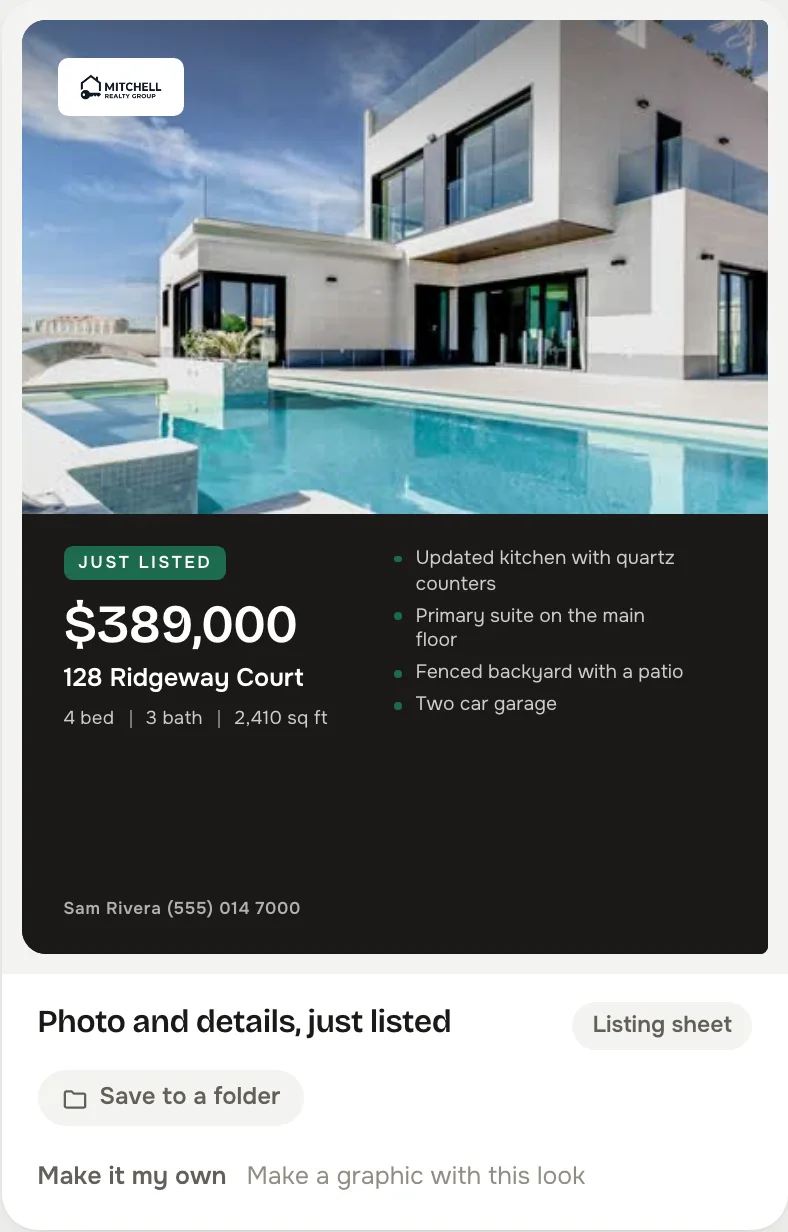
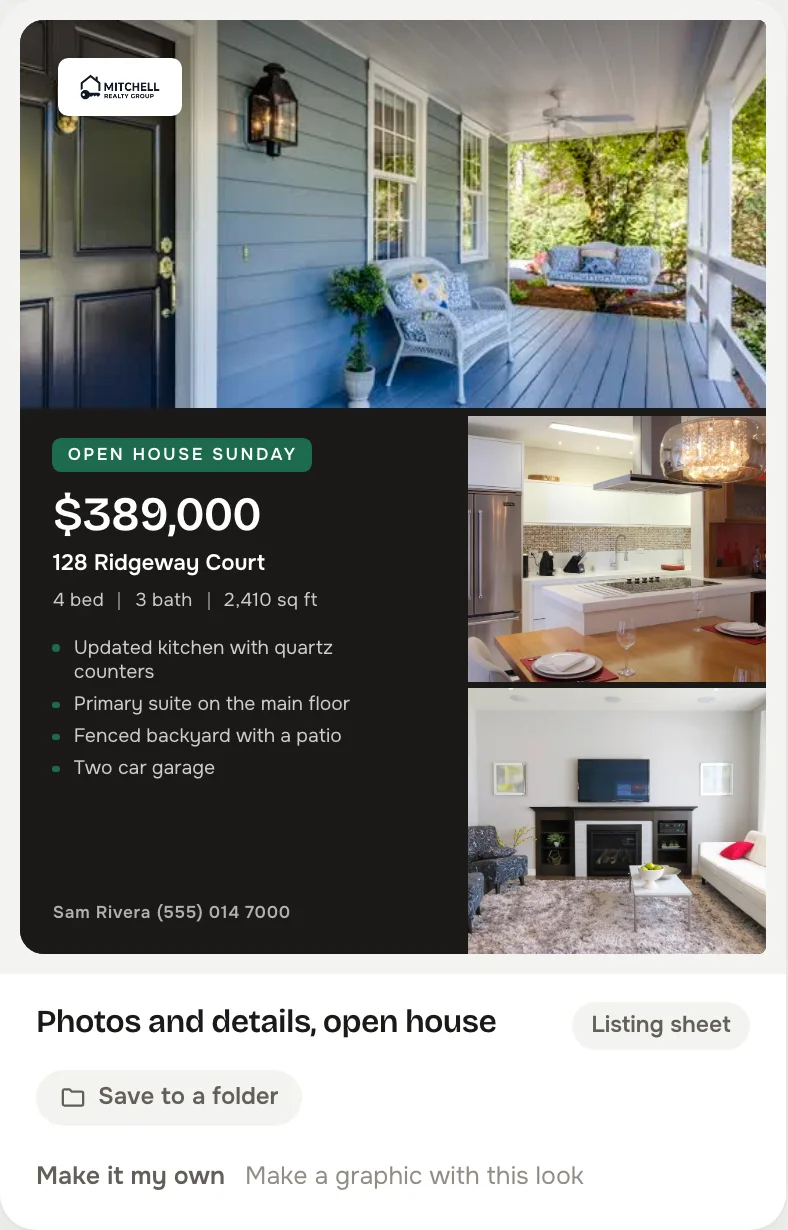
Seven families of look, in square and 4:5. The Gallery family carries two photos, three photos, or photos with the price, beds, baths, square feet and feature lines; the others cover just listed, just sold, open house, price improvement, pending and coming soon. Your logo, your headshot and your color go on every one, straight from brand setup. Make a look your own and it becomes yours to edit.

  • Price improvement
  • Pending
  • Coming soon
  • Made inside the composer. Upload a photo or pick one from your library, choose the look, fill in the address, price, beds and baths, and it renders as a real picture, ready to post.
  • Your brand or no mark at all. The studio never draws a placeholder logo. No logo uploaded means no mark, and a notice pointing you to brand setup.
  • Yours stay yours. Looks you make, and any studio look you copy, live in your own library, renamable, editable and grouped in folders.

The Gallery looks, in the live studio on the demo account. The house, the price and the agent are the studio's sample data.

In your voice

It writes the way you would. Not the way a robot would.

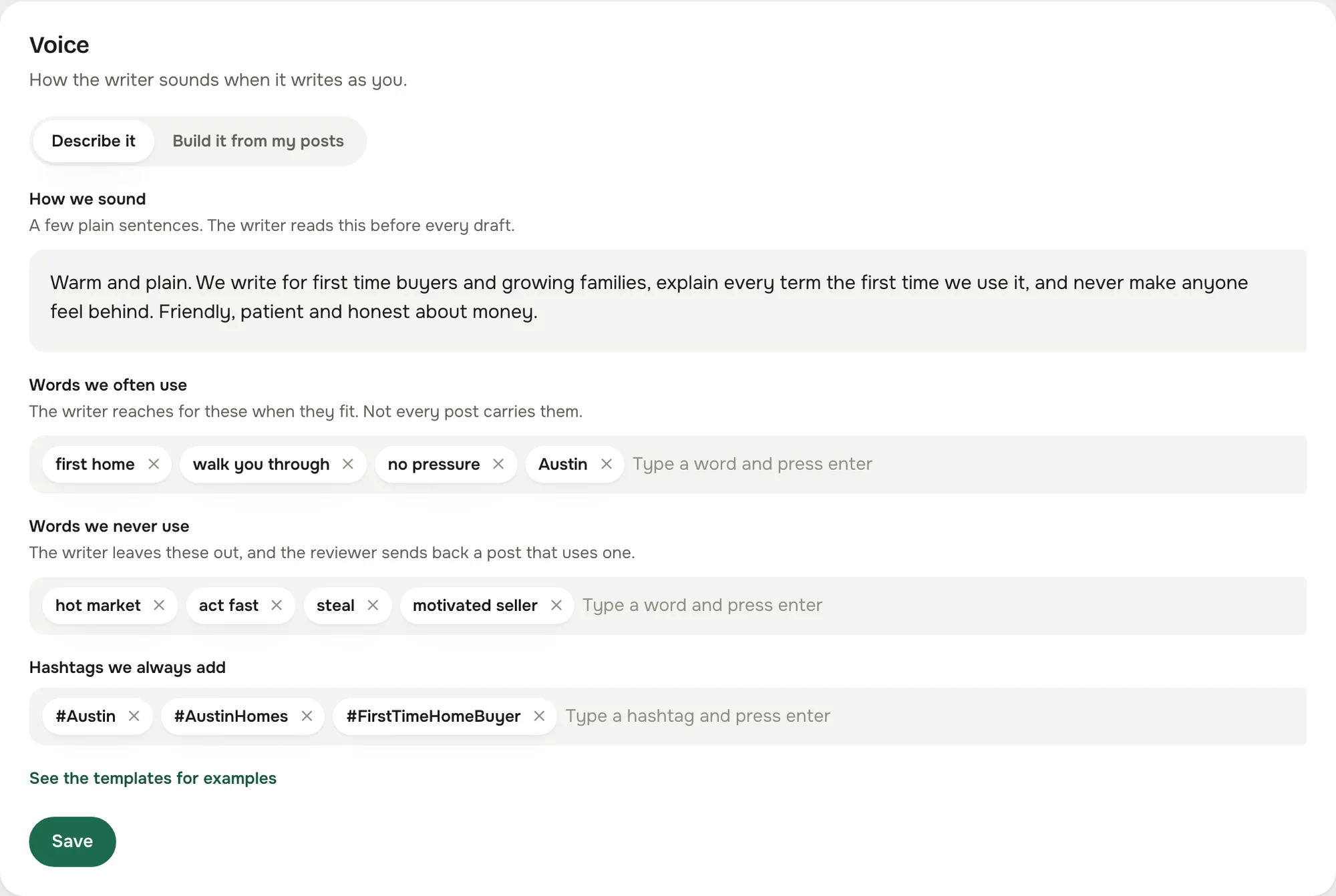
You set the voice once, in plain words: how you sound, the words you use, the words you never use, the hashtags you always add, and up to five of your own posts as samples. Every draft the studio writes reads that card first. Here is the same idea in two agents' voices, and you can tell whose is whose.

Sarah Mitchell, Mitchell Realty Group Austin, Texas
How we sound
Warm and plain. We write for first time buyers and growing families, explain every term the first time we use it, and never make anyone feel behind. Friendly, patient and honest about money.
Words we often use
first home, walk you through, no pressure, Austin
Words we never use
hot market, act fast, steal, motivated seller
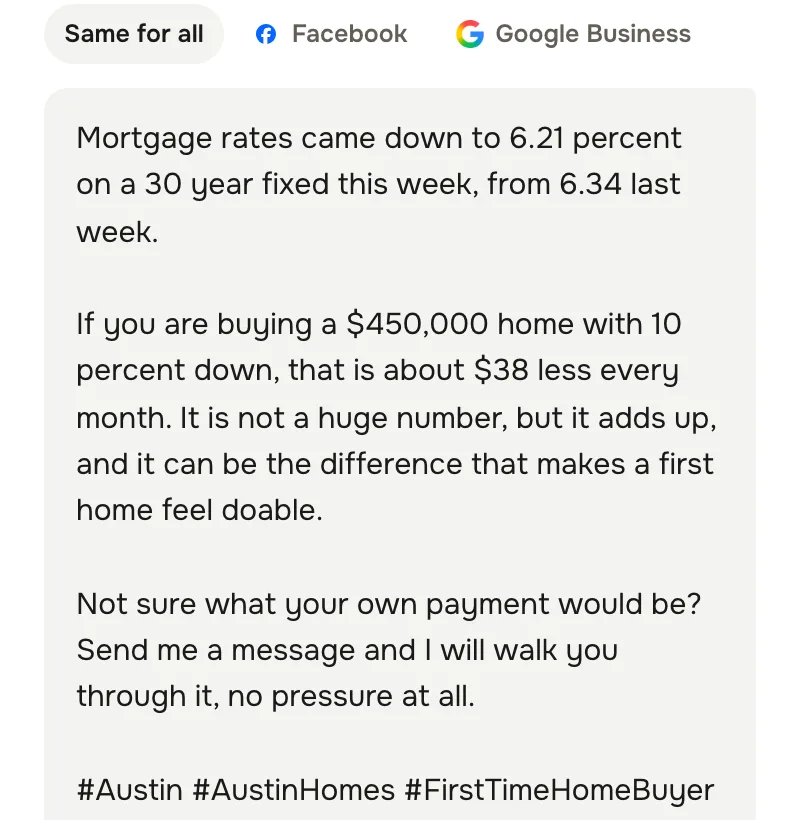
The caption of Sarah Mitchell's post about the week's rate update, in the composer, in that agent's voice
Tamsin Okereke, Sorrelwick Realty Boise, Idaho
How we sound
Plain and dry. Short sentences, real numbers, no adjectives we cannot back up. We say what changed, what it costs and what we would do. If something is not worth a post, we do not post it.
Words we often use
Boise, the numbers, per month, the Bench
Words we never use
dream home, stunning, act fast, must see
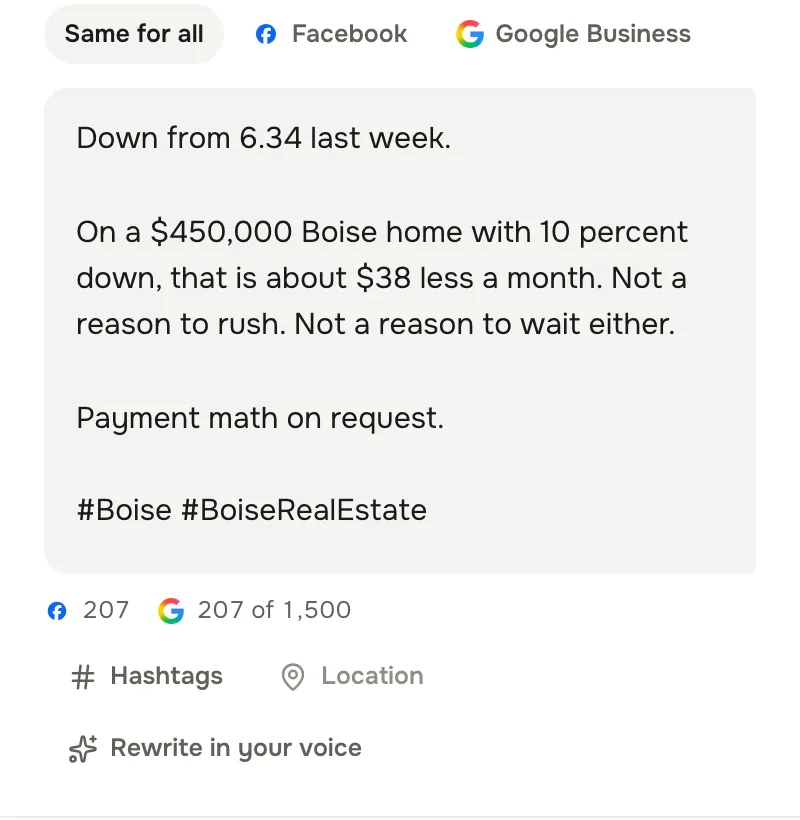
The caption of Tamsin Okereke's post about the week's rate update, in the composer, in that agent's voice

The same rate update, in two agents' voices, captured from the live studio's composer. Both agents are demo accounts and every name, listing and number is invented. Each post is written to the voice card above it, the same card the writer reads before every draft.

  • Set it once, two ways. Write the card yourself in a few plain sentences, or paste up to five of your own posts and the studio builds the card from them.
  • Every draft reads it first. The writer treats the card as the law on every planner draft. Rewrite in your voice applies it to any caption in the composer, uses your sample posts as examples, and never adds a hashtag you did not list. A post from a pasted link or a screenshot starts in your voice too.
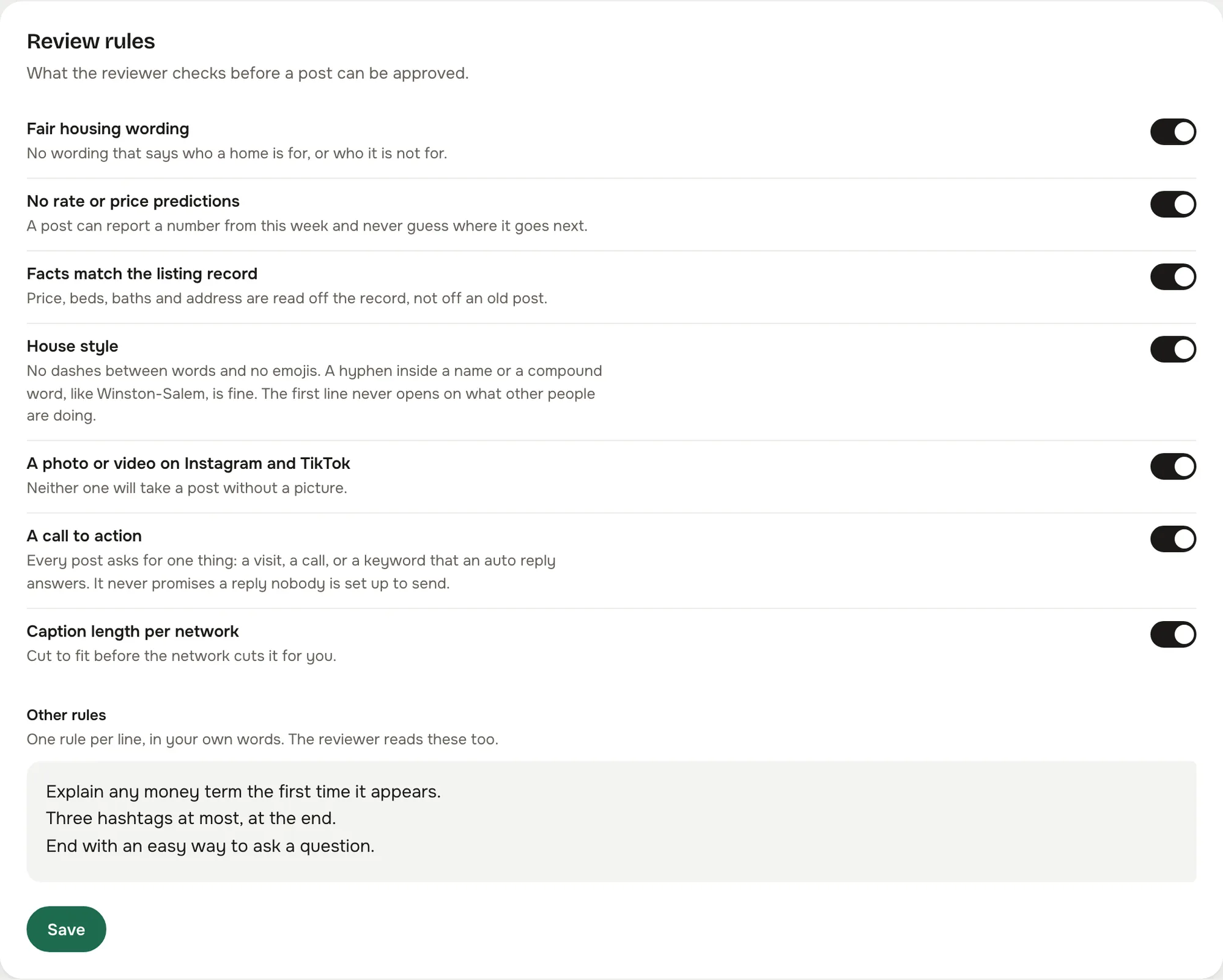
  • The reviewer holds it to the card. A draft that uses a word you never use goes back to be rewritten, along with anything that breaks fair housing wording or predicts a rate.
  • Your replies are your words. Auto reply rules send text you typed, and a review is only ever answered by a person. The studio never invents an answer to a customer.
How it runs

Five parts, one week, and you only touch the fourth.

This is what the studio is actually doing between the moment you ask for a week and the moment a post goes out. Each part hands to the next, and two of the hand backs go the other way.

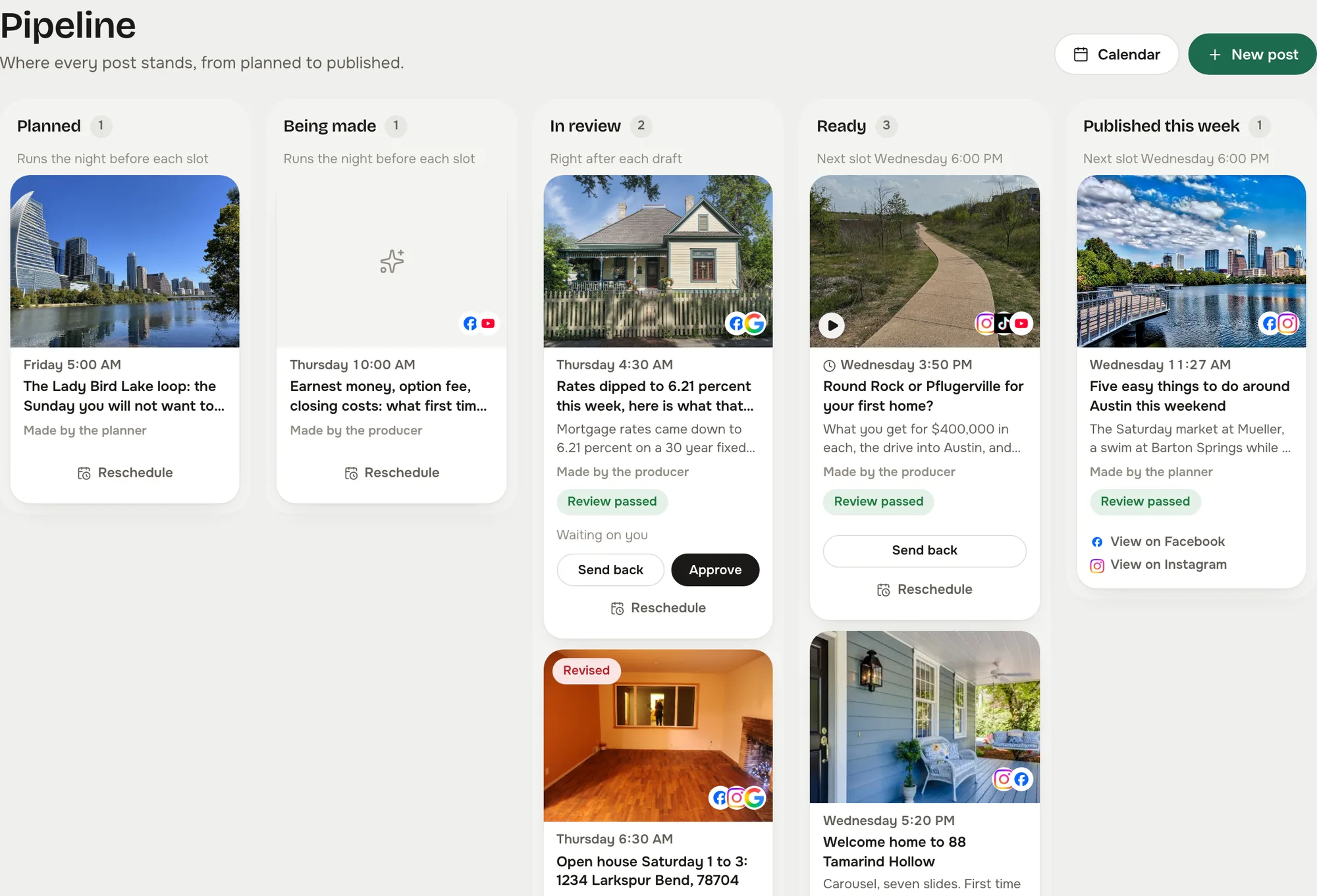
  1. When you ask for a week The planner

    Drafts a week of posts. It reads the kinds of post you allow, the idea sources you gave it (your listings, your market page, pages you told it to read, trending local news) and the per network mix, then puts one draft in each slot on the board. It never sends anything.

    Planned
  2. For each slot The writer

    Writes the post. It reads your voice card first (how you sound, words you use, words you never use, hashtags you always add), picks the least recently used picture that fits, and renders the listing graphic if the post wants one.

    Being made
  3. As soon as it is written The reviewer

    Checks the draft against your rules: fair housing wording, no rate or price predictions, facts match the listing record, house style, a photo or video on Instagram and TikTok, a call to action, caption length per network, and any rule you wrote yourself. A draft that fails goes straight back to the writer with the reason.

    In review
  4. When it passes You

    See it on Today and on the board. Approve it, edit it, or send it back with a note and it comes back rewritten. Approving schedules the post; nothing is sent at once. If you chose Send anything that passes review, only failures wait for you.

    Ready
  5. At the slot The sender

    Sends it through the studio's own clock to every network you tapped, in each network's shape, and puts the link on the card. A send that times out is checked with the network before it is called failed, so a post is never doubled.

    Published
Fails review. The reviewer sends it back to the writer with the reason, and it is rewritten before you ever see it.
You send it back. A note on the card goes to the writer, and the post comes back rewritten to the same slot.
The weekly planner

A week drafted for you. Nothing goes out without you.

Ask for a week and the studio drafts it, checks it and puts it on the board for your yes. It never posts on its own.

  1. 01

    The writer drafts each post in your voice

    You describe how you sound in a few plain sentences, or let the studio build the voice card from up to five of your own posts. The writer reads that card before every draft, and uses your own pictures.

  2. 02

    The reviewer checks it against your rules

    Fair housing wording, no rate or price predictions, facts read off the listing record, house style, a photo or video on Instagram and TikTok, a call to action, caption length per network, and any rule you add in your own words. Anything that fails goes straight back to be rewritten.

  3. 03

    You say yes on the board

    Planned, being made, in review, ready, published. Every post waits for your approval unless you choose to let reviewed posts send themselves. Approving schedules it; nothing is sent at once. Send one back with a note and it comes back rewritten.

The writer drafts each post in your voice
The reviewer checks it against your rules
You say yes on the board
One inbox

Every comment and message, in one list, with a Lead button.

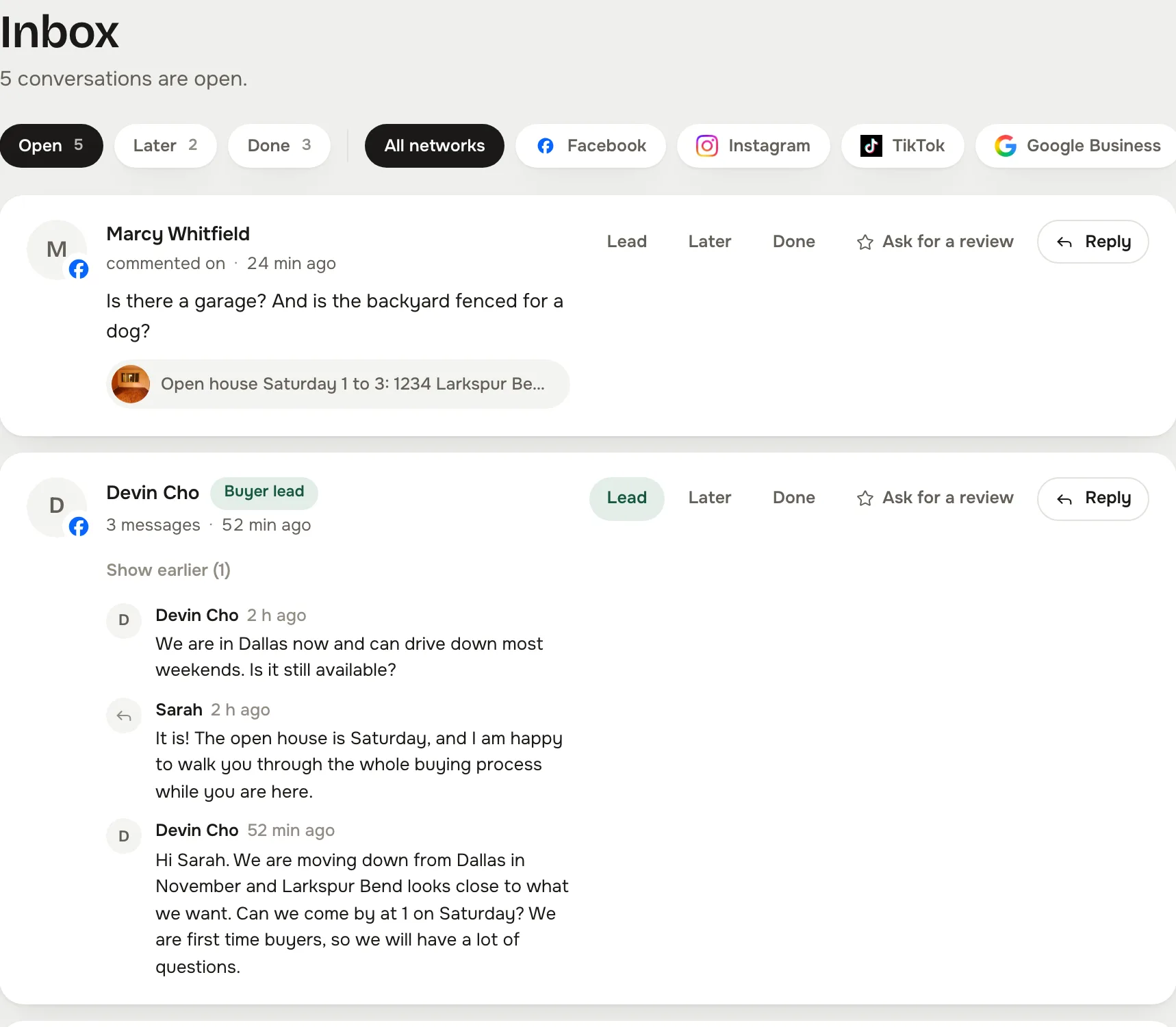
Comments and direct messages from every account you connect land in one inbox, grouped by conversation, and your Google Business reviews arrive there every hour. Reply from the card. Mark a lead and it opens a details card with name, phone, email and a note. Ask for a review from the same place.

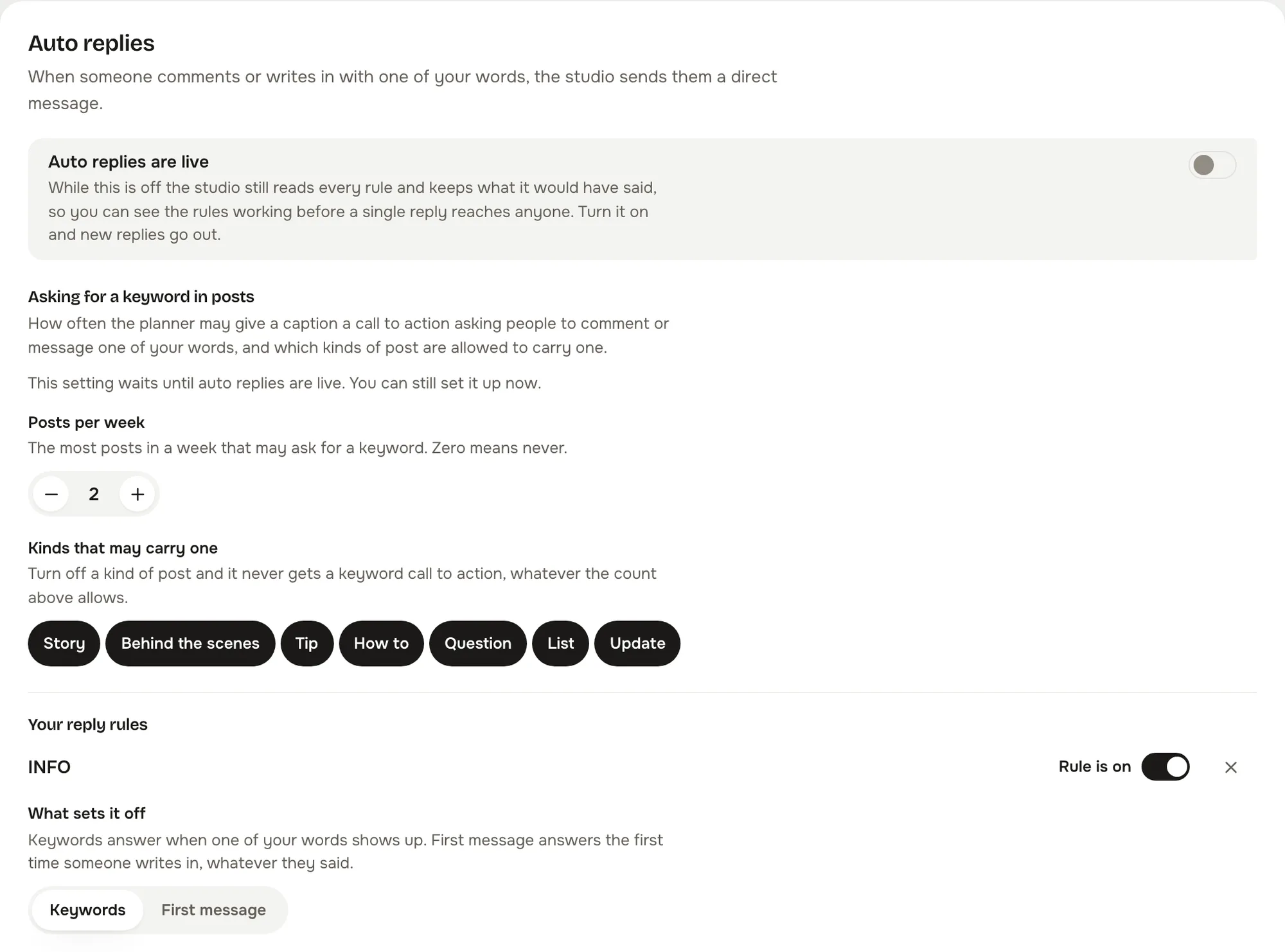
  • Keyword rules answer the questions you get every week. Hours, service area, how to book a showing: write the answer once and the rule sends it.
  • A welcome for a first message. One rule for anyone writing to you for the first time, in your wording.
  • Each rule waits. Set the minutes before a reply goes, so it reads like you and not like a bot.
  • Off until you turn it on. Auto replies ship switched off. Nothing answers on your behalf until you flip the switch, and no rule ever answers a review. Only a person does.
The inbox: conversations grouped by person, each with Reply, Lead, Later, Done and Ask for a review
The inbox, in the live studio on the demo account. Every person and message is invented.
The Auto replies card: the live switch, the first message welcome rule, and keyword rules with their wait in minutes
Auto replies, in Automation.
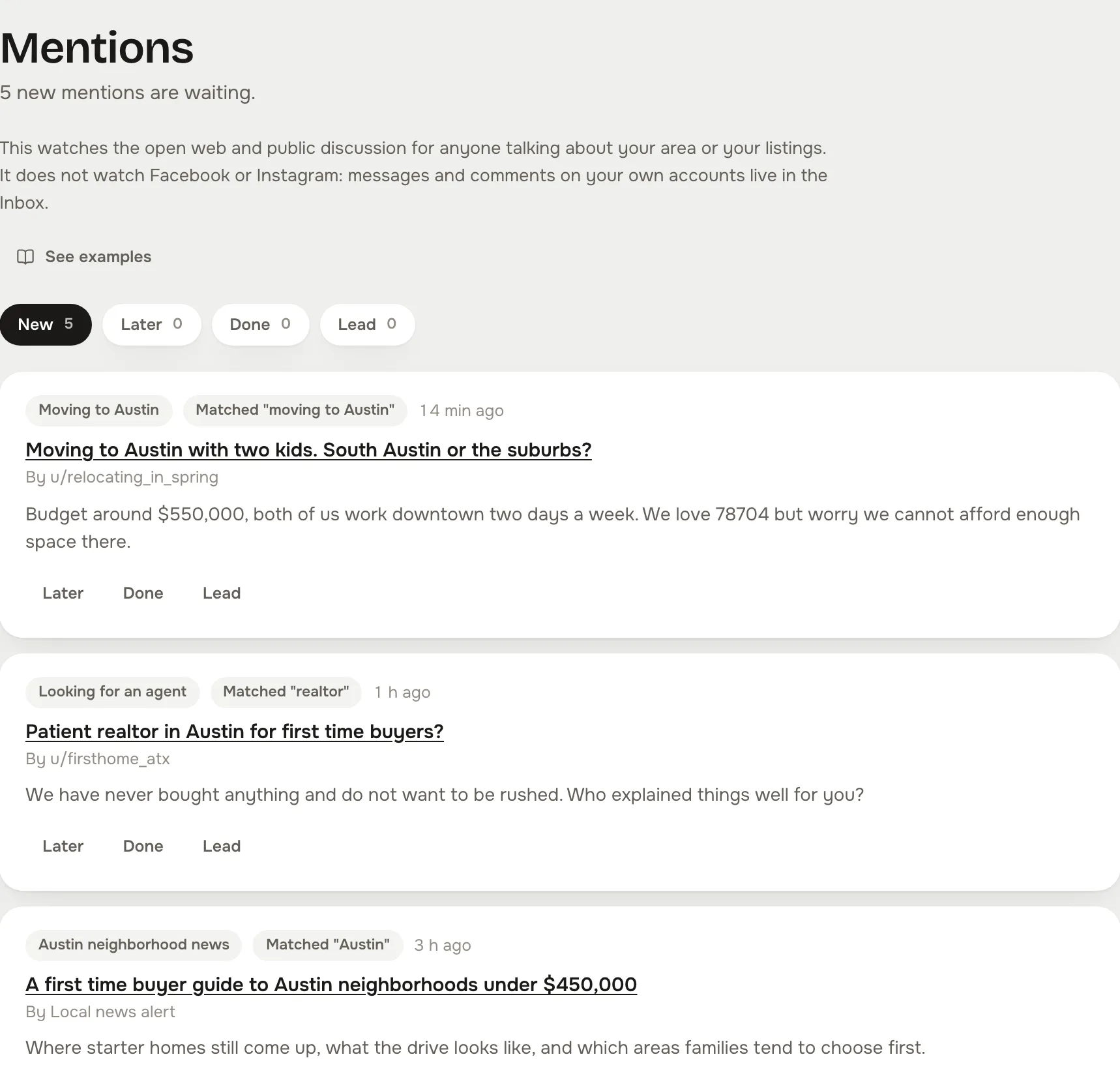
Mentions: public threads about moving to the area, each with the source it came from, the phrase it matched, and Later, Done and Lead
Mentions, in the live studio on the demo account. These are public threads, which is what listening watches.
Listening Live today

Hear people asking about your area before they pick an agent.

Listening watches the open web for anyone talking about moving to your area, looking for an agent, or asking which neighborhood fits. Each hit lands as a card with the source, the phrase it matched, and Later, Done and Lead. It runs today, on every account.

  • Reddit, through your own account. Connect Reddit and a listening source searches Reddit for your phrases every hour, newest first, through your own connected account. The card links to the thread so you can answer there as yourself.
  • Google Alerts, as a feed. Paste a Google Alerts feed and its hits land in the same list, filtered by the same terms.
  • Your own terms. Each source carries the phrases it must include and the ones it must leave out, so “Austin” does not bring you every Austin on the map.
  • A 30 day window, no repeats. Anything older is dropped, and a thread you have already seen does not come back.
  • Public discussion only. It does not watch your own accounts. Those messages and comments live in the inbox.
  • A seven step guide. Setting up a source is walked through in the studio, source by source, about two minutes each.
The studio's Today screen on a phone: what goes out today, this week so far, the next post, and the bottom bar with Today, Calendar, a new post, Inbox and More
On your phone

Between showings, the whole studio fits in one hand.

Today, the calendar, the inbox, the composer with its previews and the board are all built for a phone first, not shrunk down afterwards. Approve the day from the parking lot.

  • Today tells you what needs you. Approvals, send backs, messages and a network that needs reconnecting, in one list.
  • Install it like an app. Add it to your home screen, and on Android share a photo straight into a new post.
  • The previews come with you. Phone or desktop preview for each network, on either screen.
Everything in the studio

Everything social, not just posting.

The six things a social media manager would run for you, built as one studio inside Reclearly, so the manager is you, in the gaps between showings.

Your whole week

Everything social, in one place, in ten minutes a morning.

You used to have six apps, a notes file and no time. Now you open Today, see what goes out, see what needs you, and get back to your clients.

  • Today: what goes out, what needs you, this week so far
  • Board: planned, being made, in review, ready, published
  • Post ideas: one hundred starters in eight kinds
  • Photos: your own library, in folders you make
  • Captions: a library, plus the templates you save
Scheduling

Every account, from one calendar.

Write once, tap the networks, pick the slot. It goes out on time from the studio's own clock, and the calendar shows every post with its network marks.

  • Week and month views, drag a post to move it
  • A slot can carry several times, one per network
  • A preview per network before it goes
  • Twelve networks to connect, six in the real estate composer by default
A writer in your voice

It writes the way you talk, and it fills the week.

Describe how you sound in a few plain sentences, or build the voice card from five of your own posts. Ask for a week and the planner drafts it from your sources, the writer writes each post in that voice, and a rewrite in your voice is one tap in the composer.

  • Voice card: how you sound, words you use, words you never use
  • Planner: drafts a week from the idea sources you allow, per network, for your yes
  • Rewrite in your voice, on any caption
  • Listing graphics rendered from your own photo
Your yes

Nothing goes out without you.

Every post waits for your approval on the board, unless you choose to let reviewed posts send themselves. Send one back with a note and it comes back rewritten. Bring a teammate in and they see the shared page, never your personal accounts.

  • Approval: every post waits, or only the ones that fail review
  • Review rules: fair housing, no rate predictions, facts from the record, house style, your own rules
  • Notes on a post, with the send back
  • Shared page for the team, personal accounts only you can see
Social inbox

One inbox for every DM and comment.

Comments and messages from every connected account in one list, grouped by conversation, plus your Google Business reviews, with the button that matters most to an agent: Lead.

  • Reply, Lead, Later, Done, Ask for a review
  • Keyword rules and a first message welcome, each with its own wait
  • Off until you turn it on
  • Listening: public discussion about moving to your area
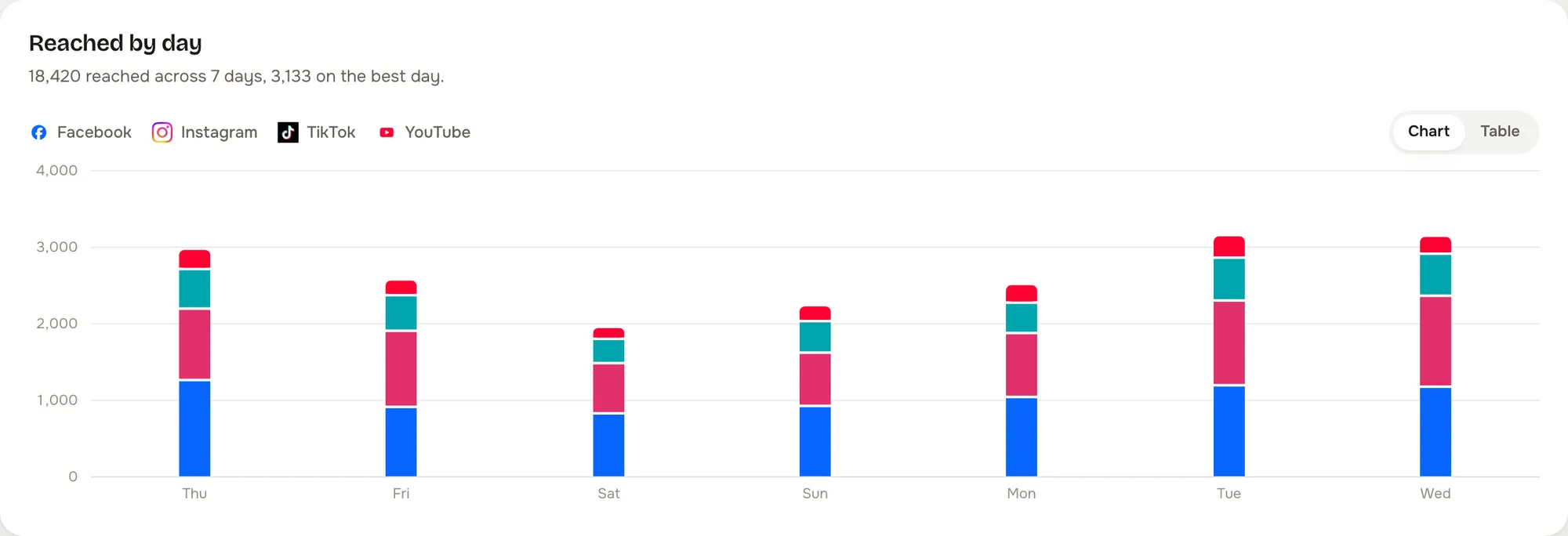
Reached by day, a bar chart with Facebook and Instagram stacked per day
Analytics

See what worked, without a spreadsheet.

What each network reports, synced daily, over 7, 28 or 90 days, colored by network, with a table view for the numbers. Links carry UTM tags so clicks come back too.

  • Reach, engagement, clicks, likes, comments, shares, posts and followers
  • 7, 28 or 90 days, colored by network
  • Unread, replies queued and new mentions on Today

Every feature, with what is live today →

Questions

The fair questions.

Straight answers.

Where do I find it?

In your Reclearly dashboard. The Social Studio link opens the studio inside Reclearly, in your own workspace, with Reclearly's navigation still around it. Your studio is created the first time you open it.

Which networks?

Facebook, Instagram, Google Business, YouTube, TikTok, LinkedIn, Threads, X, Pinterest, Bluesky and Reddit today, with Snapchat ready the day its connect opens. You connect each account once, and comments and messages from every connected account land in the inbox.

Does anything go out without me?

Not unless you choose it. The default is that every post waits for your approval, and approving schedules it rather than sending it at once. You can let posts that pass review send themselves; anything that fails review still waits for you. Auto replies are off until you turn them on, and the planner only ever drafts.

Are the graphics really my brand?

Your logo, a version of it that reads on a dark photo, your headshot and your color, all from brand setup. If you have not uploaded a logo the studio makes the graphic with no mark at all. It never draws a placeholder.

Where do the pictures come from?

Your own photo library, in folders you make, plus any photo you upload while writing. The writer picks the least recently used picture that fits. The studio's sample houses only appear in the looks library.

Does the writer sound like me?

It reads your voice card before every draft: a few plain sentences on how you sound, the words you use, the words you never use, and the hashtags you always add. You can write the card yourself or have the studio build it from up to five of your own posts. Send a draft back with a note and it comes back rewritten.