A TC on a team
You coordinate for the agents on one team or brokerage. You join their Reclearly Team plan as a Transaction coordinator, and the tasks they hand you land in one list.
For transaction coordinators
Reclearly is client portal software for real estate agents, and a transaction coordinator works inside the agent's account. Join the agent's Team plan as a Transaction coordinator, or open one file through a private link the agent shares.
Each agent's files stay in that agent's account, so Reclearly does not combine several agents' accounts into one TC view.
Last updated
Who it is for
You coordinate for the agents on one team or brokerage. You join their Reclearly Team plan as a Transaction coordinator, and the tasks they hand you land in one list.
You work for agents who each have their own account. Each agent shares a private link to the file you are working, and you open it without an account of your own.
You run your own closings. The deal view lays out the deadlines, every open item with its owner, the people on the deal, the documents and the log.
What a TC does in Reclearly
Read the purchase contract in, or type its dates once. A term like "10 days after acceptance" becomes a real date for earnest money, inspection, appraisal, financing, clear to close and closing, and anything past due is flagged.
Each step says whose move it is: the agent's, the client's or both. Mark a step as the client's and it waits for them in their portal with its due date. A step can also be assigned to a teammate or to someone attached to the file, like the lender.
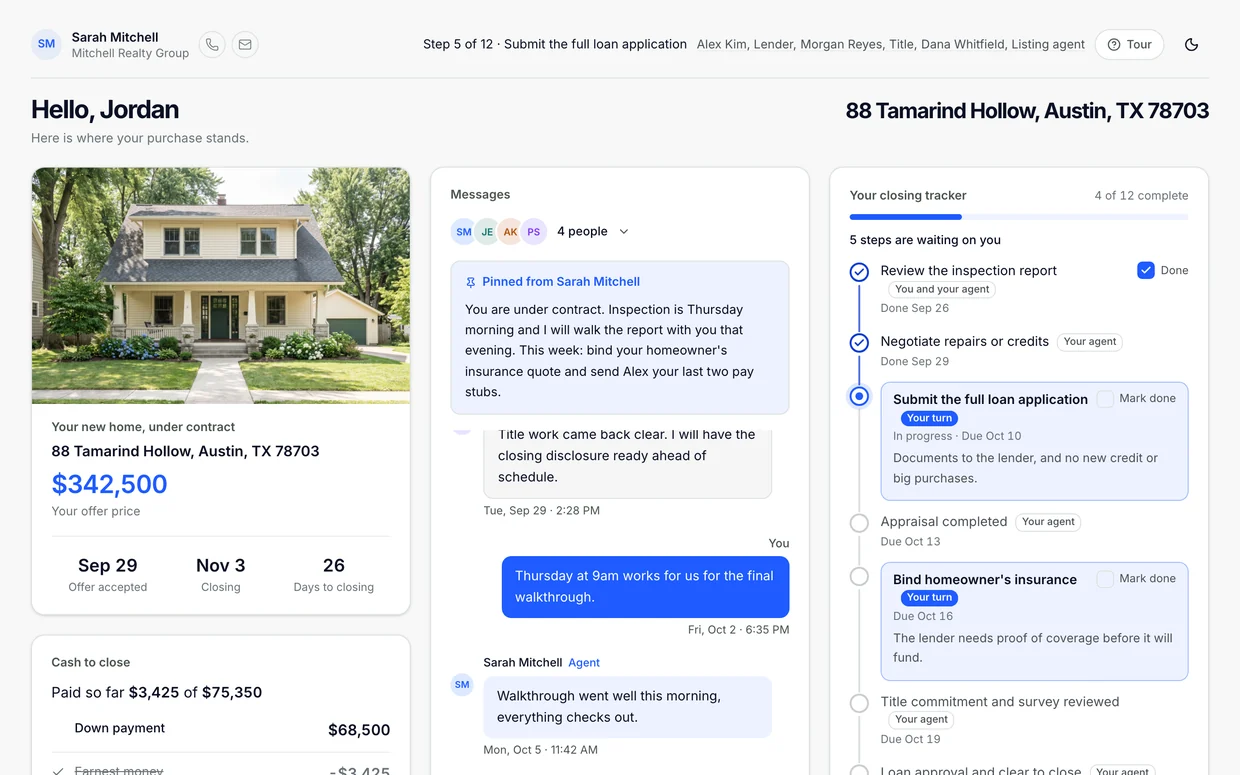
The client's portal shows the step they are on, what is done, what is next and the closing date. They can check it at 9 p.m. without calling anyone.
Overdue, due today and due this week, across the files you are on. On a team seat it is your task list. On a shared link it is the file's open items and past due count.
How a TC works with agents
On the agent's team
You see the steps assigned to you. Each agent's listings and buyers stay theirs.
On one file
No account and no cost for you. Works on Solo and Team.
If the agents you coordinate for are on one Team plan, a seat on that team gives you one task list across all of their files.
If they each run their own account, each agent shares a link per file. Reclearly has no TC workspace that combines several agents' accounts, so you keep track of those links yourself. We would rather tell you that here than have you find out on your third file.
Price
Reclearly is priced per agent account, with no per transaction fee. You can try either plan free. See every plan detail on pricing.
Team
$149
a month for 6 seats. A TC takes one. Each extra seat is $10 a month.
Solo
$24.99
a month for one agent, who can share any listing or buyer with a TC by link.
For the TC
$0
to open a file an agent shares with you. No account needed.
It keeps the deadlines, the open items and the client's status page on the agent's file. Contract deadlines are counted from the contract dates, every step has an owner, and the client sees their own progress in a portal they can check without calling. A TC gets in through the agent's account, either on a Team seat or through a private link to one file.
Not in one place today. Each agent's files live in that agent's account, and Reclearly has no TC workspace that combines several accounts. If the agents you work for share one Team plan, a seat on that team gives you one task list across their files. If they each have their own account, each one shares a link to each file, and you keep those links yourself.
Only for a Team seat. A private link to one file needs no account and costs the TC nothing.
On a Team seat, a TC checks off the steps assigned to them. A shared link is read only: the TC can see progress, documents, money and the conversation if the agent shared them, but cannot change the file or post to the client.
No. Contracts are signed and reviewed in the system your brokerage requires, such as dotloop or SkySlope. Reclearly is the client facing side of the file and runs next to them.
The agent pays, not the TC. Solo is $24.99 a month and lets the agent share any listing or buyer with a TC by link. Team is $149 a month for 6 seats, a TC takes one seat, and each seat past 6 is $10 a month. You can try either one free.
Try it free on Solo or Team. A TC you share a file with needs no account to open it.