Features
Everything it does, in one list.
57 features across your clients' portals, your workspace and the tools that bring in the next client. All of them come with Solo and Team, except Social Studio, which is an add-on.
01 · Seller portal
Everything a seller wants to know, on one private page
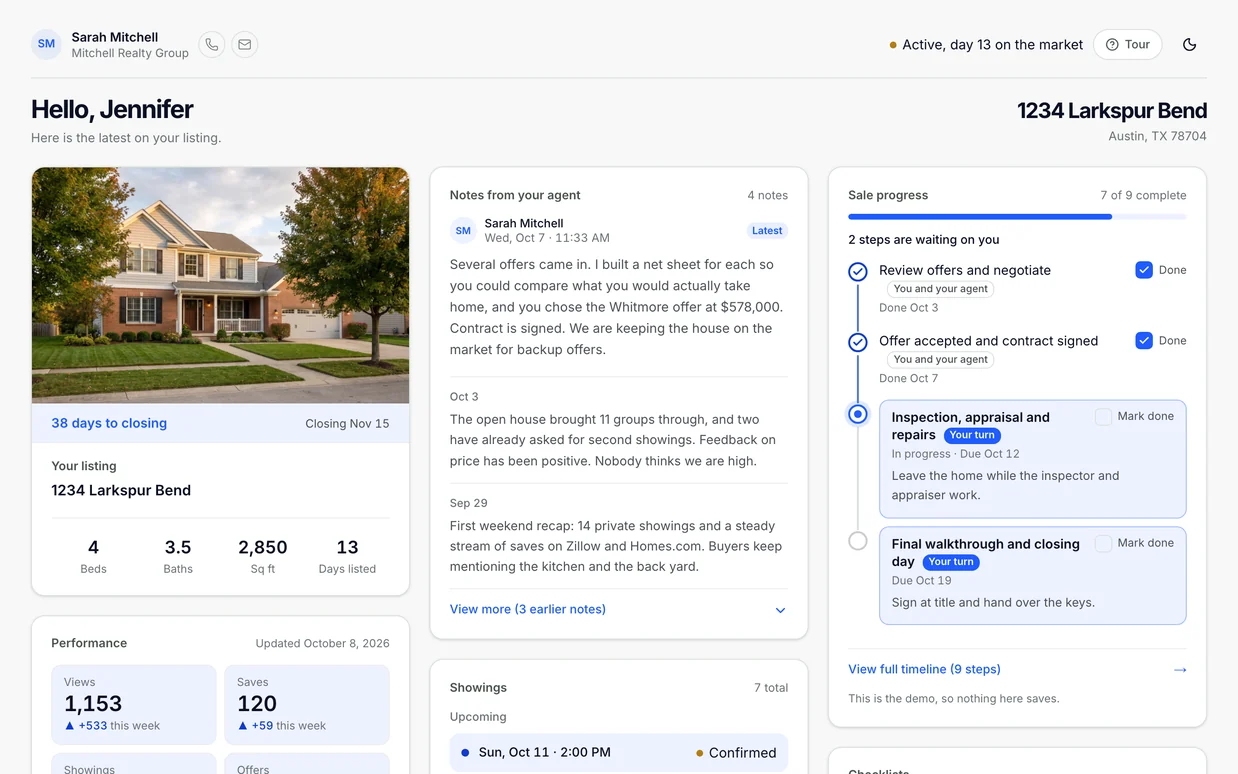
One link under your brand. Sellers see the offers, the money, the progress and the next step without calling you.
-
Automatic offer extraction
Upload the offer PDF and price, financing type, down payment, earnest money, close date, concessions and the inspection, financing and appraisal contingencies with their days are read out of it. You can always type them by hand.
-
Compare offers side by side
A Compare offers view lines up price, financing, down payment, earnest money, close date, expiration, concessions, contingencies and net. Highest price, best net and fastest close are marked. Buyer names stay hidden.
-
Net sheet per offer
Under each offer, See the net sheet opens what the seller walks away with, from the net sheet you built, or a quick estimate until you do.
-
Sale progress
Every step from photos to closing day, tagged with whose turn it is. Dates fill in from the signed contract.
-
Their own to do list
Steps that are the seller's move show as Your turn, so they know what they owe and when.
-
Showings and feedback
Upcoming showings and past showings with the buyer agents' feedback. ShowingTime appointments appear on their own.
-
Listing performance
Views, saves, showings and offers, broken out by Zillow, Homes.com, Realtor.com and Redfin, from the numbers you enter.
-
Notes from you
Written updates in one running list, newest first, so the story of the sale is in one place.
-
Open house cards
Your scheduled open houses on the listing, so the seller knows when to be out.
-
Checklists
Prepare for photos, prepare for the move, or your own. Every item has a date.
-
Messages
One thread with you, the lender and the title team, with pinned notes and attachments.
-
Documents
The contract, the disclosures and the HOA papers, each one a private download link.
-
How's the market
Mortgage rates, months of supply and the seller's ZIP: median list price, days on market and homes for sale.
-
Weekly seller digest
A weekly email that sums up the week on their sale, so they hear from you even on a quiet week.
-
You choose what they see
Every card has a Seller sees this switch. Light and dark themes and a first visit tour come built in.
Sample data throughout, from a demo account.
02 · Buyer portal
From the first tour to the keys, the buyer always knows what is next
A first time buyer gets walked through it, step by step, instead of being told to keep up.
-
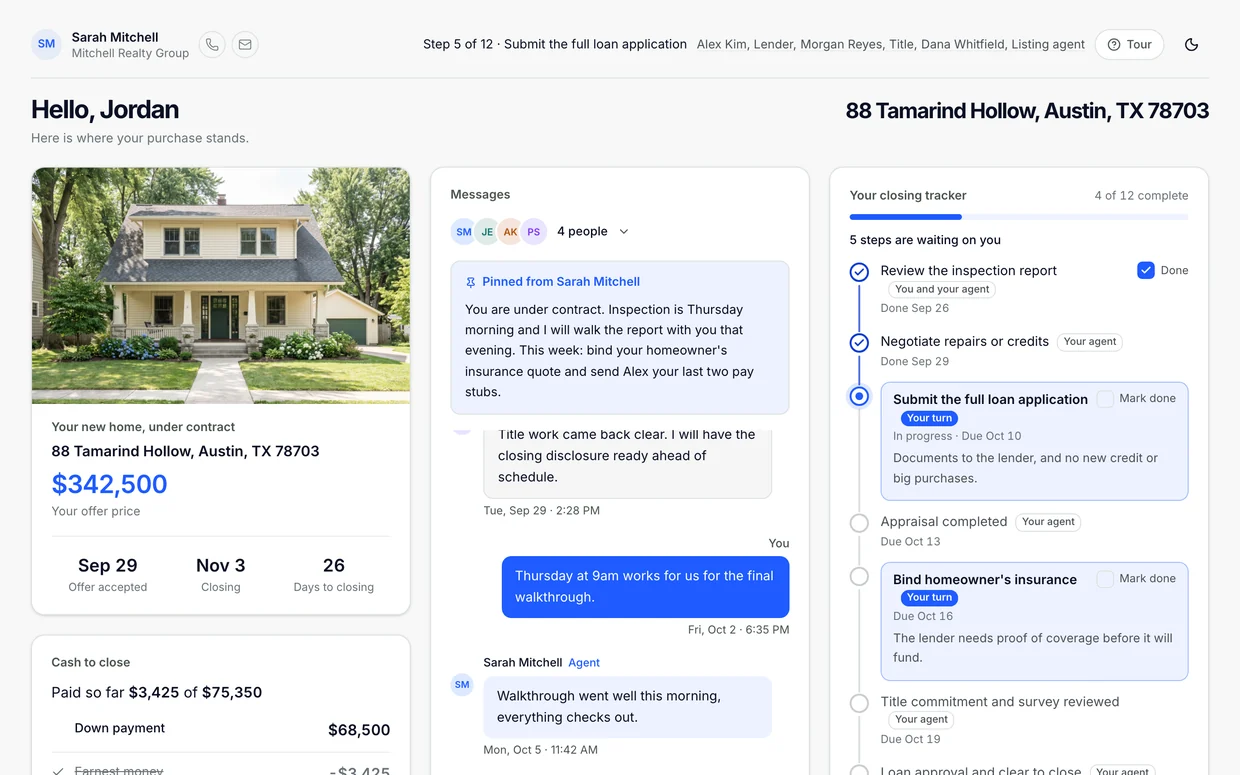
Closing tracker
Every step from offer submitted to closing day, with deadlines counted from the contract and a Your turn tag on the buyer's moves.
-
Checklists
Loan to close, next steps under contract, and a moving checklist, each item dated. Assign your own templates too.
-
Messages
One conversation with you, the lender and the title team. Pin the update that matters so it stays on top.
-
Market updates
A market card for the ZIPs they are shopping, with rates, median list price, months of supply and a plain English overview.
-
Tours
Upcoming and past tours. When you are the showing agent, ShowingTime fills them in.
-
What they're looking for
A questionnaire on the portal, or as a public intake link, so their wish list reaches you before the first tour.
-
Cash to close
Down payment, earnest money paid, estimated closing costs and prorations, with a wire fraud warning on the card.
-
Documents
Pre-approval letter, purchase contract, inspection report and title commitment, each a private download link.
-
Vendors and guides
Your recommended inspectors, lenders and movers, plus guides for every stage.
-
A homeowner view after closing
The portal stays useful after the keys, so they keep coming back to you.
Sample data throughout, from a demo account.
03 · Agent workspace
Where you run every listing, buyer and lead
What your client sees stays current because you did the work, not because you remembered to update them.
-
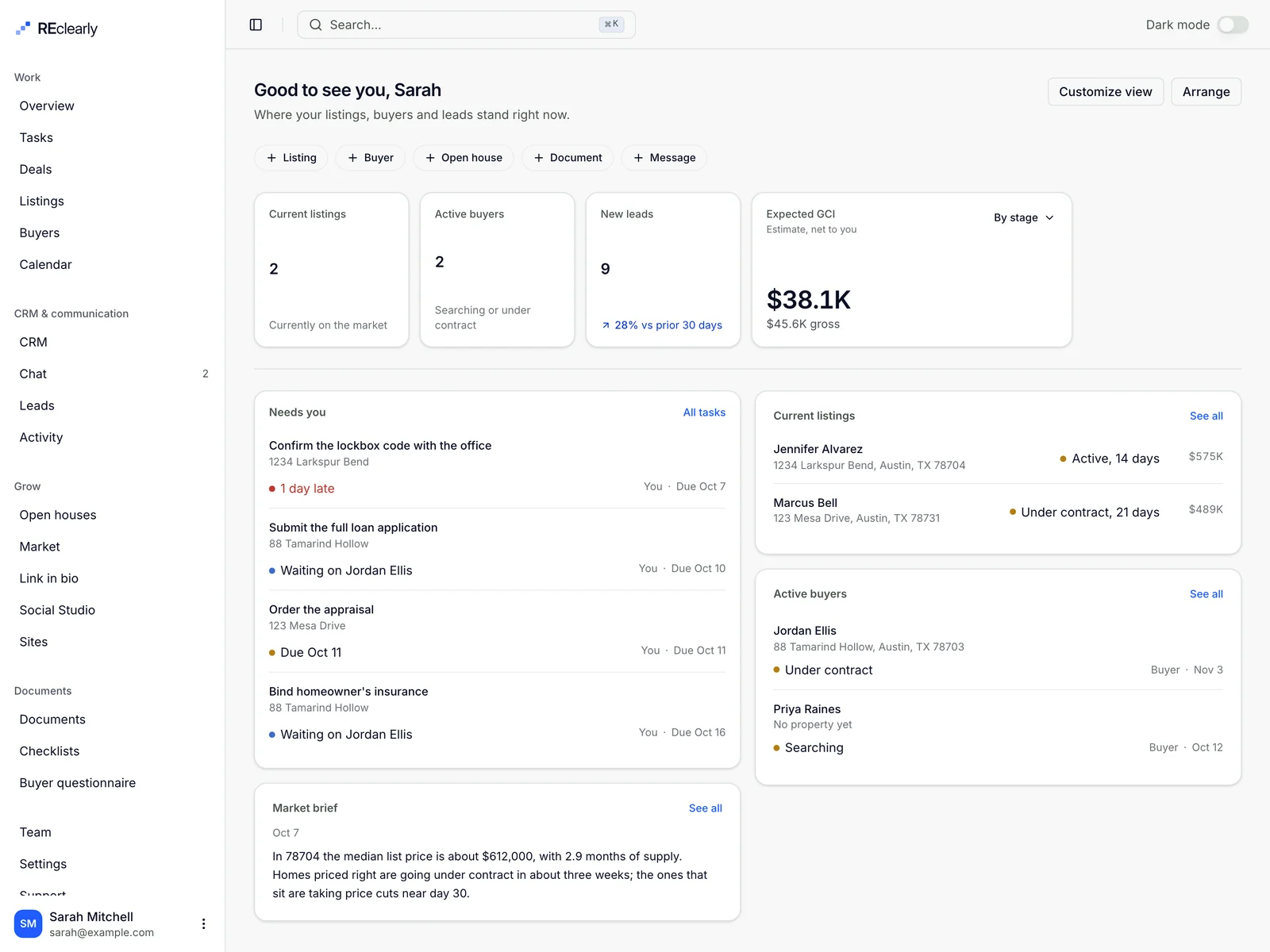
Overview
Current listings, active buyers, new leads and expected GCI net of your splits, on one screen you can rearrange.
-
CRM
Clients and professionals in one CRM, every one tied to their deals.
-
Leads inbox
Inquiries from your market page, open houses, portals and link in bio, in one inbox with a status on each.
-
Deals by stage
Every deal by stage with its pipeline value, plus a coordination view for what is due.
-
Tasks and reminders
Tasks with due dates and reminders, tied to the listing or buyer they belong to.
-
Calendar
Showings, open houses, closings, deadlines and to dos in one calendar, synced both ways with Google Calendar.
-
Chat
Every portal conversation in one place, with an unread count on the nav.
-
Client activity
What each client did last and what it signals, so you know who is engaged before you call.
-
Offer and contract reading
Offer PDFs become offer terms. A signed contract becomes the closing timeline.
-
Net sheets and commission
A net sheet builder for sellers, plus commission and expenses on every deal.
-
Checklists and templates
Build a checklist or a sale progress template once and reuse it on every deal.
-
Document folders
Folders per deal, with bulk download as a ZIP or bulk send by email.
-
Collaborators
Invite the other side's agent, the lender or the coordinator to the deal.
-
Ask Clearly
An assistant that answers from your own listings, buyers and leads, by typing or by voice.
-
Listing sites
A page for every listing, at your own address on reclearly.com.
Sample data throughout, from a demo account.
04 · Grow
Find the next client while you serve this one
The tools that bring in leads, under your brand, feeding the same inbox.
-
Open house kiosk
A sign in screen for a tablet at the door. It keeps working offline, and every sign in becomes a lead.
-
Open house QR sign in
A code visitors scan with their own phone. Follow up and document emails go out after.
-
Market page
A public page with rates, ZIP stats and buying power, with lead capture built in and a shareable market brief.
-
Monthly market newsletter
Subscribers get your market update by email on the first Tuesday of each month.
-
Link in bio
One page for your Instagram and TikTok bio: save your contact, ask what their home is worth, see your open houses. Included with every plan.
-
Social Studio
An optional add-on. Write a post once for every network, make branded graphics from your listing photos, and answer comments and messages from one inbox.
Social Studio is an add-on to Solo or Team: $34 a month billed monthly, or $30 a month billed yearly at $360 a year. 2 social accounts are included, and each account after that is $4 a month. Link in bio is included with both plans at no extra cost.
05 · Integrations
Works with the tools you already pay for
Connected from Settings. Nothing to install.
-
ShowingTime
Reads your ShowingTime calendar every 30 minutes and files each appointment on the matching listing or buyer.
-
Follow Up Boss
Deals, stage changes and client activity go to Follow Up Boss. Name, email and phone edits come back.
-
Lofty
New deals and client activity go to Lofty as leads, tags and notes. Contact edits come back.
-
Google Calendar
Showings, closings and due dates go to a calendar you choose, and date changes you make there come back.
-
Zapier
An API key for Zapier, so a Zap can read and write your contacts and deals.
-
API and webhooks
A REST API for contacts, deals, steps and documents, and webhooks for deal and portal events.
Rates and national data from FRED. ZIP data from the Realtor.com residential listings database.
06 · Your brand, your team
It looks like your business, because it is
Clients see you. Your team works from one account.
-
White label
Your logo, photo and accent color on every portal and page. No Reclearly badge on paid plans.
-
Team seats
Six seats on Team, with more available, shared templates and team branding.
-
Client sign in by email code
Links work without a login. Clients who want one can sign in with a code sent to their email.
-
No app needed, or the app
Portals open from a text or an email in any phone browser, so clients never have to download anything. Clients who like apps can use the Reclearly app for iPhone or Android instead.
-
The Reclearly app for agents
On iPhone and Android: your listings, buyers, leads, messages and calendar on your phone, so the business runs from the car, the driveway or the open house.
All of it, seven days free.
Card on file to start, first charge on day eight. Cancel from the billing page before then and you pay nothing.