Teams and brokerages

Every agent, one experience.

On a team, the client experience depends on which agent picked up the phone. Reclearly puts every listing, every closing and every client touchpoint under one brand, so the experience does not change with the agent.

6

seats included on Team. Every agent works their own listings, buyers and portals.

$10

a month for each seat past six, as the roster grows.

All

of Solo in every seat, including market data and Clearly, the built-in assistant.

Brand, not agent

One brand for every agent on the roster.

For a team, the real value is that client facing pages carry the team's brand rather than each agent improvising their own. Set team branding to Required and every teammate's client portals show the team logo, and the team color if you set one, no matter who is working the file.

  • Team logo on every teammate's client portals
  • Team color, checked for readable contrast
  • Required for everyone, or Optional so each agent decides
  • No Reclearly mark on your clients' portals
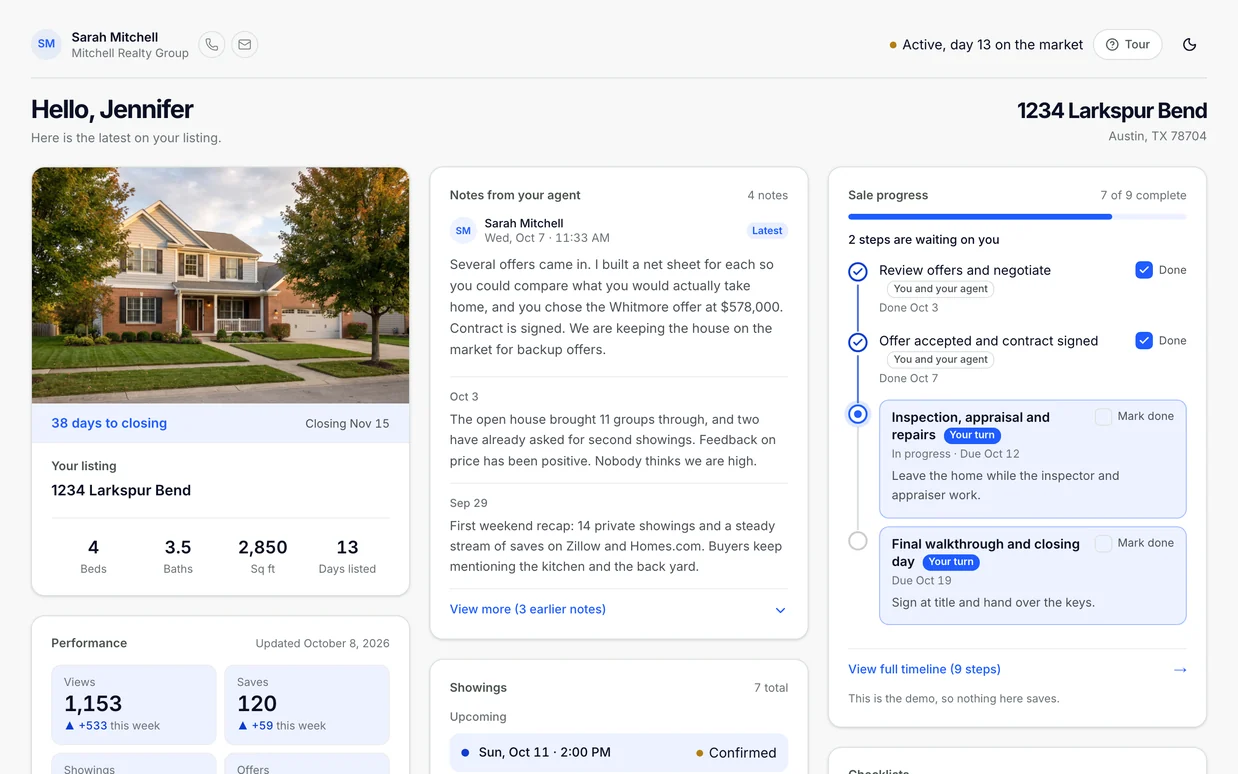
A branded seller portal on the demo account
Sample data throughout, from a demo account.

Templates

Every new file starts from a closing plan, not a blank page.

Every account starts with the same built-in checklists. Each agent can save a listing's or buyer's steps as their own template and make it the default, so new files open with the steps already in place.

  • Built-in checklists, the same on every account
  • Save any listing or buyer timeline as your own template
  • Set a default, and new listings start from it
  • Steps stay editable on each transaction
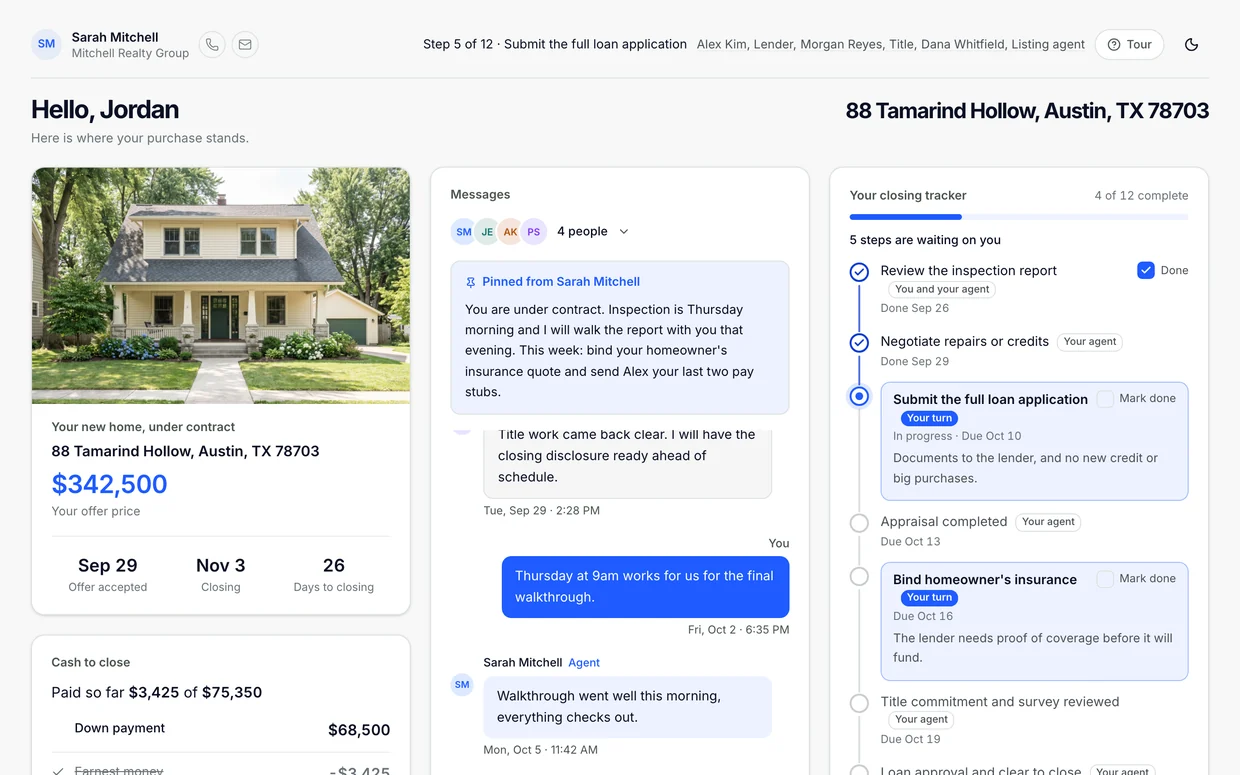
A buyer portal with the closing tracker on the demo account
Sample data throughout, from a demo account.

Shared records

Bring in a co-list agent, a TC or a lender without handing over the whole file.

Attach anyone who touches a deal to the exact listing or buyer file, and choose what they can see and change. Nobody gets more access than the record needs.

  • Attach a co-listing agent, team leader, TC or lender to any listing or buyer
  • Choose what each person sees, and whether they can make changes
  • They get their own view, separate from your client's portal
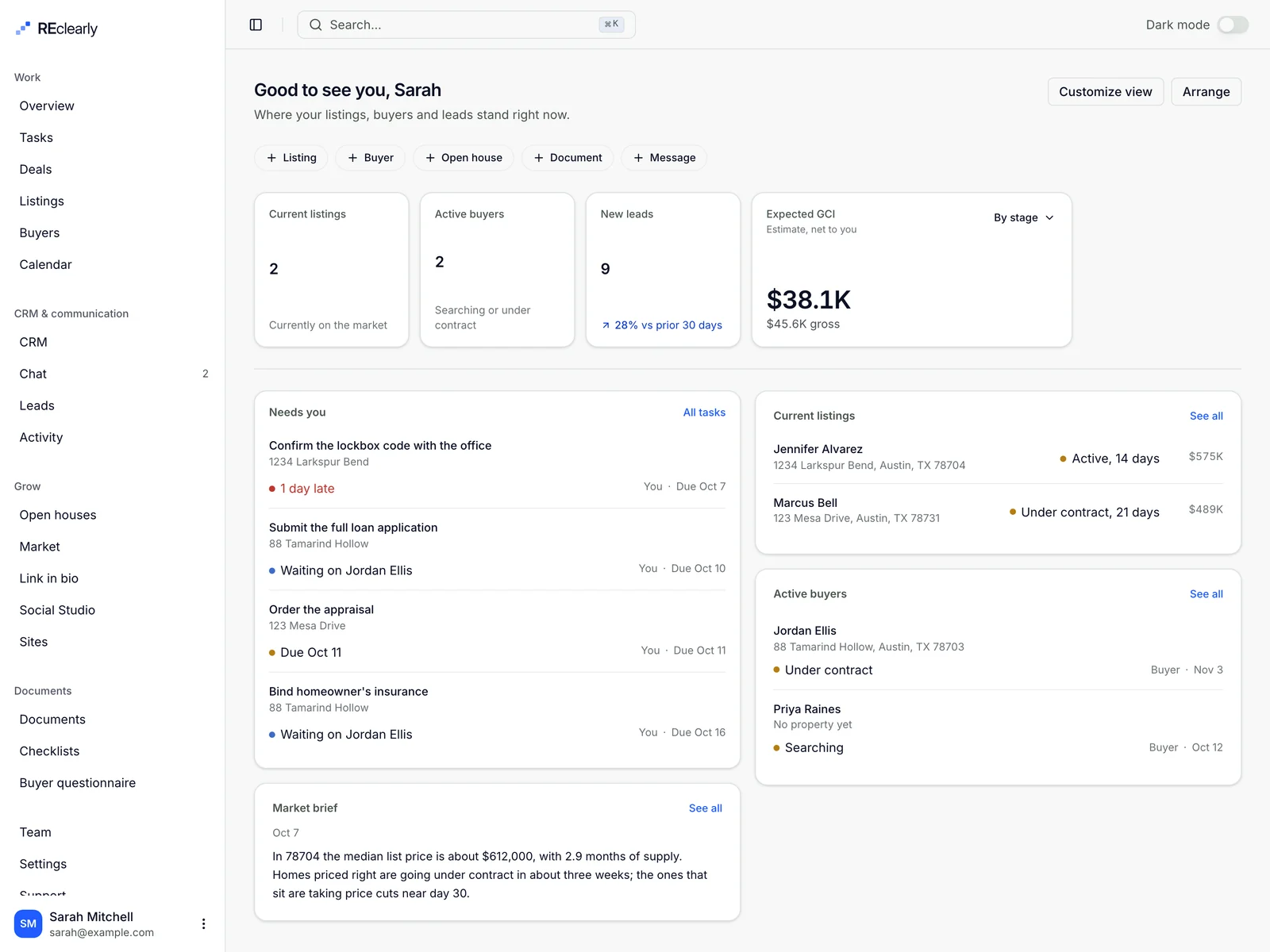
The agent workspace overview on the demo account
Sample data throughout, from a demo account.

What a team lead runs from one account.

Team gives you roles and permissions, per-file access for lenders and TCs, a team-only thread on every listing, a read-only view of each agent's deals, and email invitations. Six seats come with the $149 plan; each seat after that is $10 a month.

Everything here is live in the app. Last updated .

Give every person the right role.

Each teammate joins with a role, and the role decides what they can manage. Admins handle the roster so the owner does not have to.

Roles and permissions
Owner, Admin, Member and Transaction coordinator. Admins invite teammates and change roles. An owner cannot be demoted or removed from the Team page.
Step owners
Hand any step on a listing or buyer to a teammate, a TC or a collaborator on that file.
Team branding
Owners and admins set the team logo and color, and choose whether they are Off, Optional or Required on every teammate's portals.

Team

Invite a teammate
  • Maya Brooks Pays for the team Owner
  • Luis Ortega Can invite teammates and change roles. Admin
  • Priya Shah Works their own listings, buyers, and leads. Member
  • Dana Reyes Coordinates paperwork on the team's deals. TC
Drawn with the app's own labels and sample names.

Share one file, not the whole book.

A co-list agent, a lender or an outside TC usually needs one deal, not your roster. Attach them to that listing or buyer and switch on only what their job needs.

Shared records
Attach a co-listing agent, team leader, transaction coordinator, lender or assistant to one listing or buyer file.
What they can see
Four separate switches: sale progress and timeline, documents, offers and net sheet, and client messages. Nothing is shared until you tick it.
Let them make changes
Edit access applies only inside what they can already see. It never widens what they see.
No account needed
Lenders and TCs without a Reclearly login get a private link to their own view of the deal, separate from your client's portal. Remove them and the link stops working.

Attach a collaborator

Sam Whitfield · Lender on 412 Maple Ave

What they can see

Nothing is shared until you tick it.

Let them make changes Applies only inside what they can already see.
Drawn with the app's own labels and sample names. Tick a box to try it.

Talk about the deal where the client can't hear it.

Every listing and buyer has a Team only tab next to the client conversation, and a lead can look over any agent's shoulder without taking the file away from them.

Team thread on listings
A Team only tab in each listing's and buyer's Messages card. The file's agent, the people attached to it, and the team's owners and admins can post. Clients never see it.
View an agent's deals and tasks
Owners and admins switch the Deals and Tasks pages to any teammate and see their book, read only.
Read the team's client conversations
Teammates can read each other's client messages to cover a file, but cannot send from them.
Deal thread with the other side
When the other side's agent is on Reclearly, the two agents on a sale share a thread, and each side's team owners and admins can read and post.

412 Maple Ave · Messages

Dana Reyes · Transaction coordinator

Inspection response is signed. Appraisal is ordered for Thursday.

Luis Ortega · Team admin

Thanks. Flag me if the appraisal comes in under contract.

You · Agent

Will do. Seller asked about the walkthrough time, I'll confirm today.

Write to your team Send
Drawn with the app's own labels and sample names.

Add an agent in a minute, and know what it costs.

Invite by email with a role. Team includes six seats, and the price of every seat after that is shown before anyone is invited.

Team invitations
Enter an email and a role. The invitation is emailed from you, with your name on it, and a copy link is there if you would rather send it yourself.
Safe links
An invitation link expires after 14 days, works only for the address it was sent to, and stops working the moment you cancel it.
Seats and the extra-seat price
Six seats are included. Each seat after that is $10 a month, or $96 a year on yearly billing. Only the owner can add a paid seat, and confirms its price first.
Fair billing
A seat added mid month is prorated on the next invoice, not charged on the spot. Remove someone and the unused part is credited back.

Invite a teammate

Email

teammate@brokerage.com

Role

Transaction coordinator

This invitation is seat 7. Team includes 6 seats, so this one adds $10 a month to your subscription once they accept, prorated for the rest of the current billing period. Removing them later takes it off again.

Add paid seat and invite
Drawn with the app's own labels and sample names.

Questions team leads ask first.

How much does Reclearly cost for a real estate team?

Team is $149 a month, or $119.20 a month billed yearly at $1,430.40. It includes 6 seats. Each seat after that is $10 a month, or $96 a year, added to the owner's subscription and prorated.

What roles can people on my team have?

Owner, Admin, Member and Transaction coordinator. Admins can invite teammates and change roles. Members work their own listings, buyers and leads. A transaction coordinator coordinates paperwork on the team's deals.

Can I give a lender or an outside TC access to one deal without adding them to my team?

Yes. Attach them to that one listing or buyer and tick what they can see: sale progress and timeline, documents, offers and net sheet, or client messages. They do not need an account; they get a private link to their own view, and removing them ends it.

Can my clients see the team thread?

No. The Team only tab is for the file's agent, the people attached to the file and the team's owners and admins. Clients only see the Client & team conversation.

Can a team lead see every agent's deals?

Owners and admins can switch the Deals and Tasks pages to any teammate and see their book read only. Teammates can also read each other's client conversations, but cannot send from them.

Are templates shared across the whole team?

Not today. Every account starts with the same built-in checklists, and each agent saves their own templates from a listing or buyer and picks their own default.

What happens to the bill when someone leaves the team?

An owner or admin removes them from the Team page. If they were in a paid seat, the seat comes off the subscription and the unused part of the period is credited on the next invoice.

Pricing

Priced like a tool, not like enterprise software.

No per transaction fee, no setup call, cancel any time. The prices here are the live catalog, not a starting point for a sales call.

Most agents start here

Solo

Everything in the product, for one agent. Cancel any time.

$19.99/month

Billed yearly at $239.88 a year.

Try it free
  • Unlimited listings, buyers and ZIPs
  • Seller and buyer portals
  • Offer extraction and net sheets
  • CRM, open house kiosk and market page
  • Link in bio, included
  • Your logo, photo and color on every client portal

Team

Everything in the product, for your team. Cancel any time.

$119.20/month

Includes six seats, billed yearly at $1,430.40 a year. Extra seats are $8 a month each, $96 a year.

Try it free
  • Everything in Solo
  • Six seats included
  • Roles and per-file access
  • Seat management
  • Priority support

Social Studio Add-on

Posts, graphics and one inbox for every social account. Add it to Solo or Team.

$30/monthBilled yearly at $360. 2 accounts included, $4/month each after.

Card required to start. Cancel from the billing page any time.

Running a brokerage? Start with a conversation.

Team is $149 a month for six seats. Brokerage pricing depends on roster size, so tell us how many agents you have and which states you work in.